
Question 1
Most-appropriate topic codes (IB Computer Science HL):
• Topic $1.1$ — Systems in organizations (Parts $\mathrm{(a)}$ and $\mathrm{(b)}$)
▶️ Answer/Explanation
(a)
For the correct answer (any one):
Easily deployable and can be implemented on demand; / Cost effective — flexible payment methods such as pay-as-you-go models; / Can be accessed anywhere/anytime/from any device; / Software is always up to date at the supplier’s side without needing to install patches; / Scalability — can increase or reduce subscription very quickly; / Technical support provided by the provider.
SaaS is like renting software instead of buying it outright — you get all the benefits without the upfront cost or maintenance burden. The software runs on the provider’s servers, so your organization avoids expensive hardware investments and IT maintenance. Accessibility is another key benefit: any device with an internet connection can run the software, making collaboration seamless across locations.
(b)
For the correct answer (any one):
Confidentiality concerns if customer data is stored on the supplier’s hardware; / Stability/latency issues — dependence on a good quality internet connection; / If the service shuts down, you can lose your applications and data; / Critical business functions left in the control of a third party; / Limited customization; / Security concerns — higher risk of attack/interception.
The fundamental drawback is loss of control — your data and software sit on someone else’s servers. If the provider’s connection drops or they go out of business, your operations halt entirely. Sensitive customer data is also at risk, as a breach on the provider’s side can expose your organization without it having done anything wrong.
Question 2
Most-appropriate topic codes (IB Computer Science HL):
• Topic $1.1$ — Systems in organizations
▶️ Answer/Explanation
Answer:
User acceptance testing evaluates a product/software to make sure it meets specifications/user requirements/functions as intended; before putting it into production/before release. It serves as a quality check to identify problems and defects through user feedback, ensuring bug fixes can be completed in a more cost-effective manner.
UAT is the final gate before software is released — real end-users test the system under conditions that mirror actual use to confirm it does what was specified. Any gaps between what was built and what was needed are caught here, where they are far cheaper to fix than after go-live. It ultimately protects both the developer and the client from delivering a product that fails in the real world.
Question 3
Most-appropriate topic codes (IB Computer Science HL):
• Topic $1.2$ — System design basics
▶️ Answer/Explanation
Answer:
A hardware device that is connected to/attached to/external to/auxiliary to the computer; OR a device used for input, output or storage that is external/attached to a computer.
A peripheral sits on the “edge” of the computer system — it is not part of the core CPU or its internal memory, but connects to provide input (keyboard, mouse), output (monitor, printer), or storage (USB drive). These devices extend what the computer can do but are not required for the CPU itself to function internally. Common examples include keyboards, monitors, scanners, and external hard drives.
Question 4
Most-appropriate topic codes (IB Computer Science HL):
• Topic $1.2$ — System design basics
▶️ Answer/Explanation
Answer (any two):
Very small text and readability; / Very small functional elements / difficult to navigate; / Clutter on the screen; / Low contrast between text and functional elements / poor colour choices for visibility; / Size of screen (difficult to see in poor light); / Size of keys (difficult to access functions); / Battery life (may need to recharge frequently); / Touch screen keys (lack of tactile feedback); / Gesture (unresponsive gestures in user interfaces); / Too many clicks to complete tasks; / Limited storage/RAM.
Cell phones pack a full computing experience into a tiny form factor, which creates inevitable usability trade-offs. Small touch targets mean fingers — far less precise than a mouse — frequently tap the wrong element. Touchscreens also lack tactile feedback, so users cannot feel whether a key registered and must visually confirm every interaction, slowing them down and increasing error rates.
Question 5
Most-appropriate topic codes (IB Computer Science HL):
• Topic $1.2$ — System design basics
▶️ Answer/Explanation
Answer (any two):
Use of touch screen; / Voice recognition; / Braille keyboards; / Text-to-speech/screen readers; / Hotkeys; / Larger screens; / Larger text options; / Size and sensitivity of touchpad — larger/less sensitive touchpads.
Accessibility features ensure that users with physical or sensory impairments are not excluded. Voice recognition removes the need for fine motor control, letting users dictate commands instead of typing. Text-to-speech/screen readers convert on-screen content into audio so visually impaired users can navigate and consume information without seeing the display. Both are well-established examples of inclusive design.
Question 6
Most-appropriate topic codes (IB Computer Science HL):
• Topic $2.1$ — Computer organization
▶️ Answer/Explanation
Answer:
To hold the data/instructions to be transferred/fetched to/from the main memory/RAM of the computer (that has been read or needs to be written); using the address from the MAR.
The MDR acts as a buffer — a temporary holding area — between the CPU and main memory. When reading, data retrieved from the RAM address specified by the MAR is placed into the MDR before the CPU uses it. When writing, data is placed into the MDR first, then written out to RAM. Without it, data could not flow cleanly between the high-speed CPU and the comparatively slower main memory.
Question 7
Most-appropriate topic codes (IB Computer Science HL):
• Topic $2.1$ — Computer organization (Parts $\mathrm{(a)}$ and $\mathrm{(b)}$)
▶️ Answer/Explanation
(a)
For the correct answer:
\(\text{FB}\)
To convert \(11111011_2\) to hexadecimal, group the 8 bits into two nibbles (4 bits each): \(1111 \mid 1011\). The left nibble \(1111_2 = 15_{10} = \text{F}_{16}\) and the right nibble \(1011_2 = 11_{10} = \text{B}_{16}\). So the hexadecimal equivalent is \(\text{FB}\). This is a clean two-step method that works every time — just split into groups of four and convert each group independently.
(b)
For the correct answer:
\(01011001_2\) OR \(1011001_2\)
To convert \(89_{10}\) to binary, repeatedly divide by 2 and record remainders: \(89 \div 2 = 44\,\text{R}\,1\); \(44 \div 2 = 22\,\text{R}\,0\); \(22 \div 2 = 11\,\text{R}\,0\); \(11 \div 2 = 5\,\text{R}\,1\); \(5 \div 2 = 2\,\text{R}\,1\); \(2 \div 2 = 1\,\text{R}\,0\); \(1 \div 2 = 0\,\text{R}\,1\). Reading the remainders from bottom to top gives \(1011001_2\), or with a leading zero for 8 bits: \(01011001_2\).
Question 8
Most-appropriate topic codes (IB Computer Science HL):
• Topic $5.1$ — Abstract data structures
▶️ Answer/Explanation
Answer (any two):
Running recursive processes; / Holding return memory addresses / function call; / Expression evaluation and conversion / evaluating arithmetic expressions; / String reversal; / Interrupt handling; / Undo/redo in gaming/any other example; / Backwards navigation on a web browser; / Backtracking path in algorithms; / Depth-first search algorithms; / Reversing a queue.
Stacks operate on a Last-In, First-Out (LIFO) principle, which perfectly suits situations where you need to reverse the order of operations or retrace steps. When a program calls a function recursively, each call’s return address is pushed onto a stack — when the function finishes, the address is popped so execution returns to the right place. Similarly, your browser’s back button works by popping the previously visited URL off a history stack.
Question 9
Most-appropriate topic codes (IB Computer Science HL):
• Topic $6.1$ — Resource management
▶️ Answer/Explanation
Answer (any two):
Scheduling — selecting a process from a ready queue and allocating CPU time to it for execution.
Time Slicing — allocating fixed fractions of time to each process to enable programs to appear to run simultaneously.
Virtual Memory — a section of secondary storage set up to act as primary storage, extending the apparent RAM available to programs.
Paging — a memory management mechanism used to swap equal-sized pages of processes between secondary and primary storage as they are needed.
Interrupt — a signal from hardware or software requiring the processor to pause its current task and service a higher-priority request.
Polling — the constant checking of the status of connected devices to determine whether they need CPU attention.
The OS must share limited CPU and memory resources among many competing processes fairly and efficiently. Scheduling decides which process gets CPU access and for how long, while virtual memory extends the usable memory by spilling overflow to disk — making it appear the system has more RAM than physically exists. Both techniques are invisible to the user but critical for smooth multitasking.
Question 10
Most-appropriate topic codes (IB Computer Science HL):
• Topic $7.1$ — Control
▶️ Answer/Explanation
Answer (any one):
Water level/ultrasonic sensor — to switch the water supply on/off as required / to ensure sufficient water is in the machine / to keep the door locked until water drains.
Proximity sensor — to make sure the door is closed before starting the machine.
Vibration sensor — to stop the drum spinning if the load is unbalanced.
Speed (of rotation) sensor — to ensure the drum rotates at the correct speed for the wash cycle.
Load/weight sensor — to measure the weight of laundry and adjust washing parameters.
Pressure sensor — to monitor water pressure and water levels inside the tub.
Moisture sensor — to control auto-dry cycles / determine how dry the clothes are.
Dirt sensor — detects soil and detergent levels and adjusts the washing cycle.
A washing machine is a classic closed-loop control system where multiple sensors work together. A water level sensor, for example, continuously monitors how full the drum is and signals the valve to open or close accordingly — preventing floods or underwashing. Each sensor type converts a physical property into an electrical signal that the microprocessor can compare against target values and act on.
Question 11
Most-appropriate topic codes (IB Computer Science HL):
• Topic $7.1$ — Control
▶️ Answer/Explanation
Answer:
Input to the system is provided by sensors / the temperature sensor; / Sensors continuously send digitised data to the microprocessor / ADC converts data collected from sensors to digital data and sends it to the microprocessor; / The microprocessor compares the input readings against stored values / required temperature settings; / This difference/error value is fed back to the microprocessor to perform a suitable action (by heater/cooler) / the error value is fed back as an input to the system; / The above steps are repeated until the system is turned off, which maintains the temperature of the room.
Feedback is what makes a control system self-correcting. The temperature sensor continuously reads the room temperature and sends that value to the microprocessor. The microprocessor compares the actual reading against the desired set-point, calculates the difference (error), and commands the heater or cooler to compensate. This corrected output is itself then measured again by the sensor, creating a continuous loop that keeps the room at the target temperature without human intervention.
Question 12
(a) (i) Identify two characteristics of fibre optic cables as a transmission medium.
(a) (ii) Identify two characteristics of wireless transmission.
(b) Describe how encryption is used to protect data during transmission.
(c) Explain how data is transmitted using packet switching.
(d) Explain one social implication of changes to working patterns due to the use of a virtual private network (VPN).
Most-appropriate topic codes (IB Computer Science):
• Topic $3.1$ — Networks (Parts $\mathrm{(a)(i)}$ to $\mathrm{(d)}$)
▶️ Answer/Explanation
(a)(i)
For the correct answer (any two):
Allows very fast transmission of data / extremely high bandwidth possible; / Immune to electromagnetic interference / temperature changes / severe weather / highly resistant to noise and moisture; / Very high security rating; / Very long distance of transmission before requiring repeaters / attenuation; / Long lifespan (thinner and lightweight, so more flexible than other media); / Expensive / harder to install.
Fibre optic cables transmit data as pulses of light through glass or plastic fibres, which gives them extraordinary bandwidth and makes them immune to electromagnetic interference. Because light doesn’t degrade as quickly as an electrical signal, these cables can carry data over very long distances before needing repeaters.
(a)(ii)
For the correct answer (any two):
Uses radio waves / electromagnetic waves to transfer data; / Transmission speed of data is limited; / Range / reliability can be affected by distance from access point / number of other users / obstacles; / Inexpensive to install / no need to spend on cabling; / Security can be poor (unless encryption is applied) / subject to eavesdropping/interception; / Allows users to move around without losing network access.
Wireless transmission uses radio waves so no physical cables are needed, making it easy to add devices and allowing users to roam freely. However, signal quality degrades with distance, physical obstacles, and network congestion, and the open-air broadcast nature makes it inherently more vulnerable to eavesdropping than wired connections.
(b)
For the correct answer:
Plain text is changed to cipher text / data is scrambled using an encryption algorithm/key / a key is required by sender and receiver for authentication; / Cipher text/data cannot be understood if intercepted; / The cipher text/data is then decrypted using a (decryption) key when received by the receiver.
Before data is sent, an encryption algorithm uses a key to scramble the original plaintext into unreadable cipher text. Even if an attacker intercepts the data in transit, they see only meaningless characters without the correct key. At the receiving end, the recipient uses a matching decryption key to reverse the process and recover the original data.
(c)
For the correct answer :
The whole data is split into (fixed/equal) sized chunks/packets; / Each packet has a header, payload and trailer; / Packet contains information such as source address, destination IP address, packet number, protocol, checksum, payload/data, CRC etc. (at least two); / Packets may take different routes to the destination; / If a route becomes unavailable, individual packets can be re-routed; / Packets may arrive at the destination out of order; / Packets are re-ordered/joined together at the destination; / Missing packets can be re-sent.
In packet switching, large data is broken into small, equal-sized packets each labelled with a header containing source/destination IP addresses and a sequence number. Routers independently forward each packet along the fastest available route, so different packets of the same message may travel via completely different paths. At the destination, packets are reassembled in the correct order using their sequence numbers, and any missing packets are re-requested and re-sent.
(d)
For the correct answer:
Example 1 — Positive: Improved work/life balance; working from home / access to work materials has become much easier/more secure, allowing more time spent at home; time saved not commuting can be spent with family/hobbies; flexible hours reduce stress, improving mental health.
Example 2 — Negative: Negative impact on work/life balance; employers may have higher expectations because the employee has saved commuting time; workers may feel they cannot switch off or that they are not trusted to be productive at home, leading to poorer mental health.
Example 3 — Isolation: Working from home may result in less collaboration/teamwork; different time zones may prevent effective communication; feelings of isolation can affect mental health and productivity.
VPNs enable employees to securely access company networks from anywhere, which has normalized remote working. On the positive side, this saves commuting time and offers greater schedule flexibility, improving work–life balance. However, blurring the boundary between home and office can create pressure to be always available, making it harder for workers to genuinely disconnect after hours.
Question 13
nor Boolean operator. 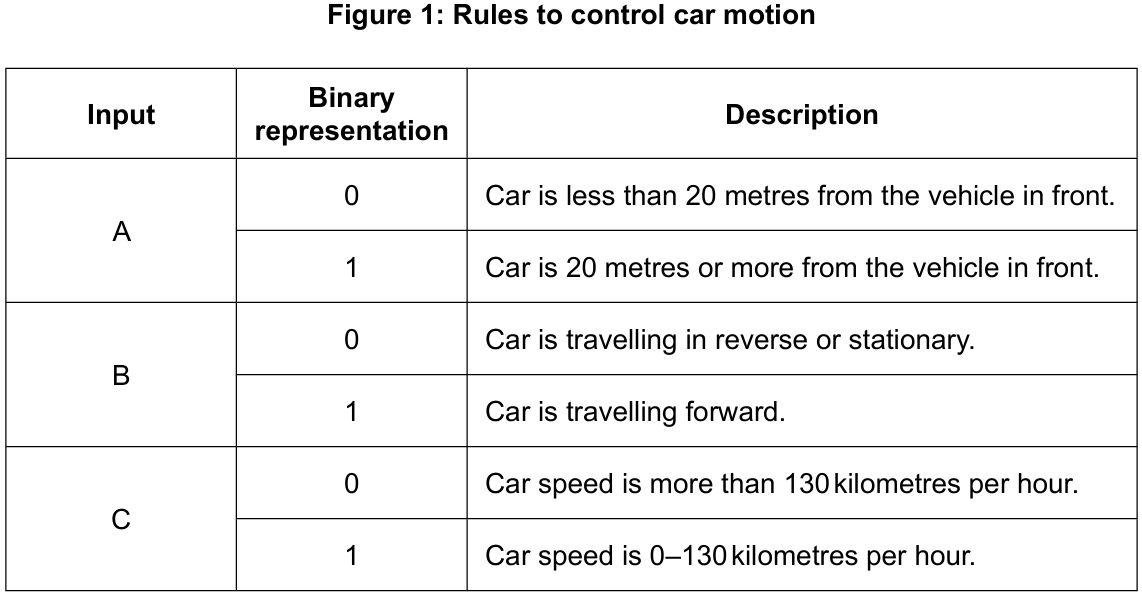
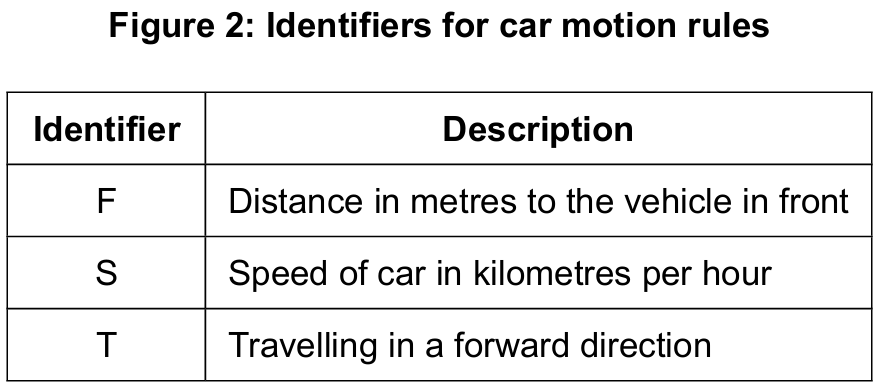
F = 5
S = 30
T = true

F >= 25 AND S >= 10 AND S <= 130 AND T = true
Most-appropriate topic codes (IB Computer Science SL):
• Topic $2.1$ — Computer organization (Parts $\mathrm{(a)}$ and $\mathrm{(b)}$)
• Topic $4.1$ — General principles (Parts $\mathrm{(c)}$, $\mathrm{(d)}$ and $\mathrm{(e)}$)
▶️ Answer/Explanation
(a)
For the correct answer (description OR truth table):
Outputs the value of one if and only if all inputs have a value of zero.
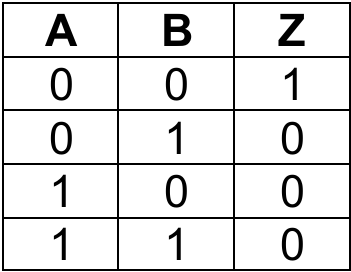
NOR is essentially a NOT applied to an OR gate — it only outputs 1 when every input is 0. The moment any input goes high, the output drops to 0. It is the complement of OR, just as NAND is the complement of AND.
(b)
For the correct answer:
The output Z should represent $Z = A’ \cdot B + C’$, meaning:
• Correct NOT gate with input A;
• Correct NOT gate with input C;
• Correct AND gate — one input from NOT(A) and one from B;
• Correct OR gate — inputs from AND gate output and NOT(C), output is Z.
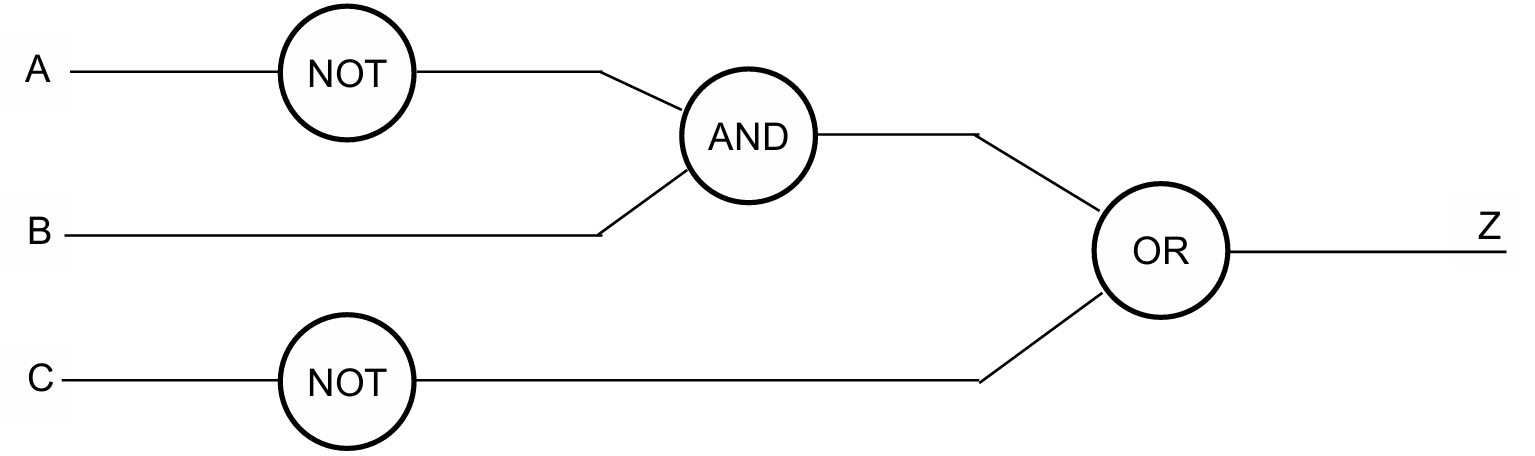
Reading the scenario: “travelling forward AND less than 20m” translates to $B=1$ AND $A=0$, i.e. $B \cdot \overline{A}$. “Speed more than 130 km/h” means $C=0$, i.e. $\overline{C}$. The two conditions are joined by OR, giving $Z = \overline{A} \cdot B + \overline{C}$. A NOT gate on A, AND with B, then OR with NOT(C) produces Z.
(c)
For the correct answer (rules for 0 and 1 can be reversed):

Input D follows the same convention as the existing inputs in Figure 1: binary 0 represents the dangerous/trigger condition (obstruction is close), and binary 1 represents the safe condition (no obstruction within 3 m). This matches the pattern used for input A, where 0 = car is too close to the vehicle in front.
(d)
For the correct answer:
5 >= 25 AND 30 >= 10 AND 30 <= 130 AND true
false AND true AND true AND true
Output = false
Substituting the given values: $F=5$ fails the first condition $F \geq 25$ ($5 \geq 25$ is false). Because AND requires all parts to be true, once the first sub-expression is false the entire compound expression is immediately false — no matter what the remaining values are. The overall result is false.
(e)
For the correct answer:
Use of flag (or otherwise) to maintain continuous loop; appropriate loop structure (while/repeat..until); inputs for distance and speed inside the loop; correct conditions to implement alarm notification; correct output of alarm; correct condition to cause loop to stop. Do NOT accept break to terminate the loop.
FLAG = true
loop while FLAG
    input D
    input S
    if D < 20 OR S > 130 then
        output "ALARM!!"
    end if
    if S = 0 then
        FLAG = false
    end if
end loop
The algorithm uses a boolean flag to keep the loop running while the car is moving. Inside the loop, it reads the distance and speed inputs, checks whether either threshold is breached, and outputs an alarm if so. The loop only exits when speed equals zero — meaning the car has stopped — which is the correct termination condition rather than a break.
Question 14
(f) (i) Identify one other hardware resource within tablet computers and desktop computers.
(f) (ii) Explain why the network connectivity of a desktop computer is different to the network connectivity of a tablet computer.
Most-appropriate topic codes (IB Computer Science):
• Topic $1.1$ — Systems in organizations (Part $\mathrm{(a)}$ to $\mathrm{(d)}$)
• Topic $6.1$ — Resource management (Parts $\mathrm{(e)}$ and $\mathrm{(f)}$)
▶️ Answer/Explanation
(a)
For the correct answer (any two):
Malicious activities / hacking / malware / viruses / worms; / Natural disasters; / Accidental loss / human error; / Hardware/power breakdown; / Data transmission errors; / Poor backup strategies; / Software failure.
Data can be lost through both deliberate and accidental causes. A hacker deploying ransomware can encrypt or destroy data intentionally, while a power outage or hardware failure can wipe unsaved data with no malicious intent at all. Human error — such as accidentally deleting a database — is also a surprisingly common cause that organizations often underestimate.
(b)
For the correct answer:
Customers may arrive at the hotel when the hotel doesn’t expect them / overbooking; causing loss of business/bad reputation/money for the hotel. / Hotel is unable to plan; as it doesn’t know how many reservations have been lost. / Hotel cannot contact customers to confirm bookings; because customer details were lost with the reservations data.
Without reservations data, the hotel cannot know which guests are expected on any given day, leading to chaotic check-in experiences, potential overbooking, or empty rooms that should have been filled. Guests who arrive only to find no record of their booking will almost certainly leave very negative reviews, causing lasting reputational damage that far outweighs the immediate inconvenience.
(c)
For the correct answer:
Regularly back up data by making a copy of current transactions; storing another copy in another/secure/offsite location / in a fireproof safe. / Use a failover/redundant system; so if anything happens to the main system, the alternative is implemented immediately. / Use offsite/online/cloud storage; data can still be accessed if hotel hardware is unavailable. / Use firewalls/anti-malware/anti-virus; to prevent malicious activities and errors during transmission. / Provide training to employees; to avoid accidental deletion or human error.
The most widely recommended method is regular, automated backups stored in a geographically separate location. If the hotel’s on-site servers are damaged — by fire or flood, for example — the off-site backup ensures the data can be fully restored. For maximum protection, the “3-2-1 rule” is used: three copies of data, on two different media types, with one stored off-site.
(d)
For the correct answer:
Data not being stored/transferred correctly / data loss / data corruption; due to incompatible software/hardware/file formats/data structures/validation rules/power failure. / Data inconsistencies/incompatibility; due to incompatible conventions of dates/currencies/time/character sets. / Potential security risks; due to breach of sensitive information, data leakage and unauthorized access during data transfer.
The most common migration problem is data incompatibility — the old system may store dates as DD/MM/YYYY while the new system expects YYYY-MM-DD, for example, causing records to be misread or rejected. Similarly, currency formats or character encodings used in different countries may not translate cleanly, resulting in corrupted or meaningless data appearing in the new system after migration.
(e)
For the correct answer (at least 1 difference and 1 similarity):
Primary and secondary storage in a tablet have a lower capacity compared to desktop computers; / Storage in a tablet is smaller in physical size and more compact to allow for portability; / A desktop computer may have multiple secondary storage devices; the tablet usually has a single solid-state device; / A tablet’s memory usually cannot be upgraded easily; a desktop’s primary and secondary memory can be upgraded with ease; / In both types, secondary memory has a slower access time compared to primary memory; / In both, primary memory can be volatile while secondary memory is non-volatile.
Both tablets and desktops use the same hierarchy — fast but volatile primary storage (RAM) and slower but persistent secondary storage — but they differ significantly in scale. Desktops can house multiple large hard drives and expandable RAM, while tablets prioritize compactness and portability, typically offering fixed, soldered storage that cannot be upgraded after purchase.
(f)(i)
For the correct answer (any one):
Processor / graphics processor; / Cache; / Screen (size/resolution); / Network card (NIC); / USB port; / Sound processor.
Both tablets and desktops contain a processor (CPU) as a common hardware resource, though the specific type differs — desktops typically use high-performance desktop-class chips, while tablets use lower-power mobile processors designed to balance performance with battery life.
(f)(ii)
For the correct answer:
Desktop computers can access a network using a wired/ethernet connection; / Tablet computers use a wireless connection to connect to the network; / Desktop computers can connect at higher data transfer speeds due to wired connections; / Desktop computers don’t generally have mobile connectivity unless a network card is added; / Tablet computers are more flexible in terms of where they can access a network due to portability; / Tablet computers’ network connectivity is more prone to be affected by obstacles/distance from the access point/number of other users.
Desktops are stationary and typically connected via Ethernet, offering faster, more stable, and more secure connectivity. Tablets rely on Wi-Fi or cellular connections, which are convenient for mobility but are more susceptible to interference, distance limitations, and bandwidth sharing with other wireless users. The physical Ethernet port simply does not exist on a standard tablet.
Question 15
(a) (ii) Outline one drawback of using dynamic data structures

(d) (ii) State all the leaf nodes in the binary tree sketched in part (d)(i)
Most-appropriate topic codes (IB Computer Science):
• Topic $5.1$ — Abstract data structure (All Parts)
▶️ Answer/Explanation
(a)(i)
For the correct answer:
Efficient use of memory; memory is allocated during execution as needed / memory is deallocated and re-used when no longer required.
OR: There is no need to predefine the size of a dynamic data structure [1]; so it can grow or shrink in size depending on requirements.
OR: Efficient insertion and deletion operations can be carried out [1]; with the adjustment of pointers / no need to shift elements.
Unlike a static array where you declare upfront “I need space for exactly 100 items,” a dynamic data structure like a linked list can grow and shrink as needed during program execution. This is hugely beneficial in real-world applications where you don’t know how many items you’ll need to store — for example, a hotel reservation system where the number of bookings changes by the minute. Memory is only consumed when actually needed, so there is no wasted allocation sitting idle.
(a)(ii)
For the correct answer:
Memory overflow; can happen if more memory is used than has been allocated/available.
OR: Memory underflow; can happen if attempting to delete an element from an empty data structure.
OR: Harder to program; because it is more difficult to keep track of the size and location of the data structure.
OR: Potential for memory leaks; when allocated memory is not properly deallocated after use.
OR: More memory usage for the set amount of data; as dynamic data structures require additional memory to store pointers.
OR: Slower execution time; due to manipulation of pointers / more programming statements required.
Every node in a dynamic structure like a linked list needs to store not just the data but also a pointer to the next node. These pointers add memory overhead that static arrays simply don’t have. Additionally, if the programmer forgets to free memory when nodes are deleted, the programme accumulates “leaked” memory over time, eventually causing the system to slow down or crash — a notoriously difficult bug to track down in large systems.
(b)
For the correct answer (any 5):
Initialise pointer to head/start of linked list; check if data item is desired value/21; if not, store the value of pointer in previous pointer; and then change the pointer to next position in linked list; repeat until data item 21 is found (or until end of list reached); if data item 21 found, change the next (pointer) of the previous pointer to point to the following node/node containing 30; clear the memory for the deleted node/node containing 21.
Start at the head (node 6) and compare its data with 21 — not a match. Save a “previous” pointer pointing at node 6, then advance the current pointer to node 15. Still not 21, so save previous = node 15 and advance to node 21. Found it! Now change the “next” pointer of node 15 to skip over node 21 and point directly to node 30. Finally, free (deallocate) the memory occupied by node 21. The list now reads: 6 → 15 → 30 → null.
(c)
For the correct answer:
A node contains a data element [1]; a node has two pointers — a pointer to a left child (node) and a pointer to a right child (node).
A binary tree node is like a three-part container: one slot holds the actual data value, and two other slots hold pointers — one pointing to the left subtree (for values smaller than the current node in a binary search tree) and one pointing to the right subtree (for larger values). If either child does not exist, that pointer is set to null.
(d)(i)
For the correct answer:
                  18
                /    \
              15      25
             /       /   \
            6       21    36
           /             /   \
          2            30     40
Insert each number following BST rules (left if smaller, right if larger than current node): 18 becomes root. 15 < 18 → left child of 18. 25 > 18 → right child of 18. 6 < 18, < 15 → left child of 15. 2 < 18, < 15, < 6 → left child of 6. 21 > 18, < 25 → left child of 25. 36 > 18, > 25 → right child of 25. 30 > 18, > 25, < 36 → left child of 36. 40 > 18, > 25, > 36 → right child of 36. Inorder traversal (left, root, right) gives: 2, 6, 15, 18, 21, 25, 30, 36, 40 — correctly sorted in ascending order.
(d)(ii)
For the correct answer:
\(2,\ 21,\ 30,\ 40\)
Leaf nodes are nodes that have no children — both their left and right child pointers are null. Looking at the tree: node 2 has no children, node 21 has no children, node 30 has no children, and node 40 has no children. All four are therefore leaf nodes.
Question 16
input X
loop while (lenString(X) < 1) AND (lenString(X) > 100)
    output "The string's length is out of range, please try again"
    output X
end loopJ = ""
loop C from 1 to 4
input X
input Y
input Z
R = subString(X, Y, Z)
S = revString(R)
J = joinString(S, J)
end loop
output J
Most-appropriate topic codes (IB Computer Science):
• Topic $4.2$ — Connecting computational thinking and program design (Parts $\mathrm{(a)}$ to $\mathrm{(c)}$)
• Topic $4.3$ — Intriduction to programming (Parts $\mathrm{(b)}$ and $\mathrm{(c)}$)
▶️ Answer/Explanation
(a)
For the correct answer (shown in bold):
input X
loop while (lenString(X) < 1) OR (lenString(X) > 100)
    output "The string's length is out of range, please try again"
    input X
end loop
Error 1: AND must be OR — a string cannot simultaneously have length less than 1 AND greater than 100; the loop must repeat if either condition is true. Error 2: output X should be input X — the loop needs a new value from the user, not to print the old invalid one; otherwise the loop runs forever on the same bad input.
(b)
For the correct answer (award [1] per correct column pair: J; C and X; Y and Z; R; S):
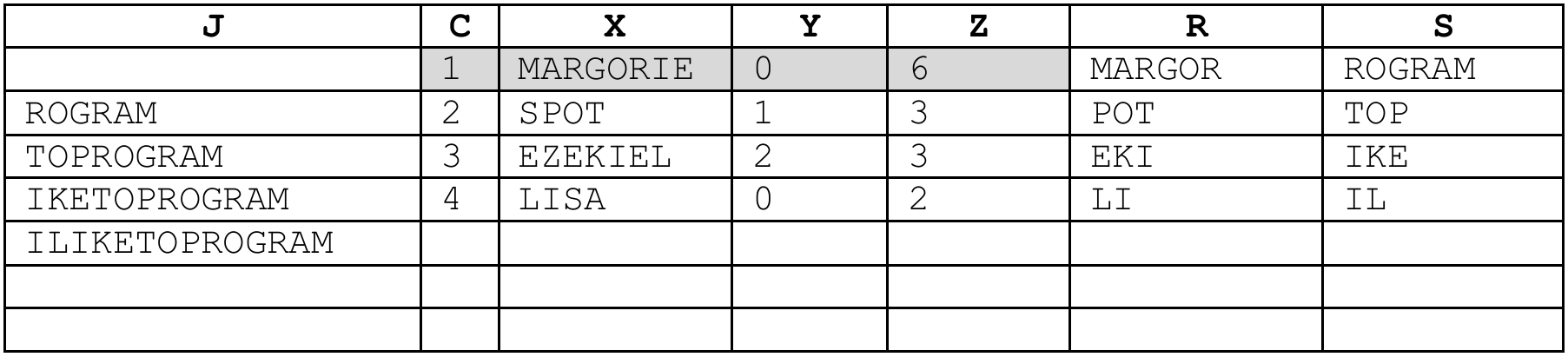
Final output J = ILIKETOPROGRAM (“I LIKE TO PROGRAM”). Each iteration extracts a substring, reverses it, and prepends it to J. Row 1: subString("MARGORIE",0,6) = “MARGOR” → reversed = “ROGRAM” → J = “ROGRAM”. Row 2: subString("SPOT",1,3) = “POT” → reversed = “TOP” → J = “TOPROGRAM”. And so on.
(c)
For the correct answer:
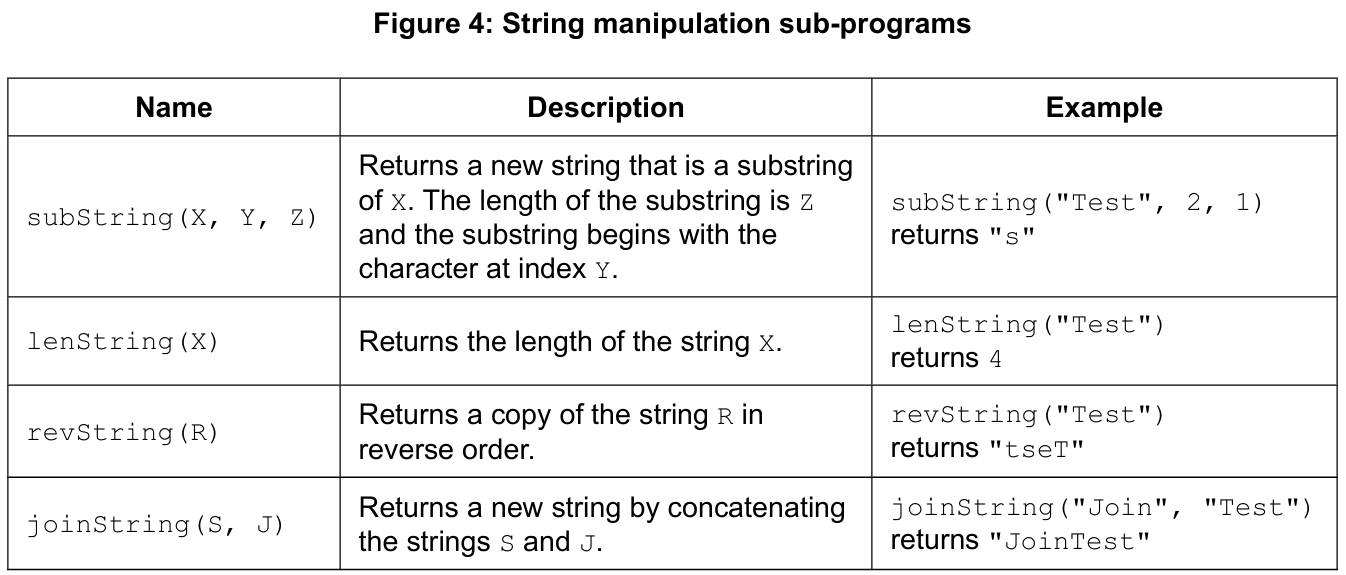
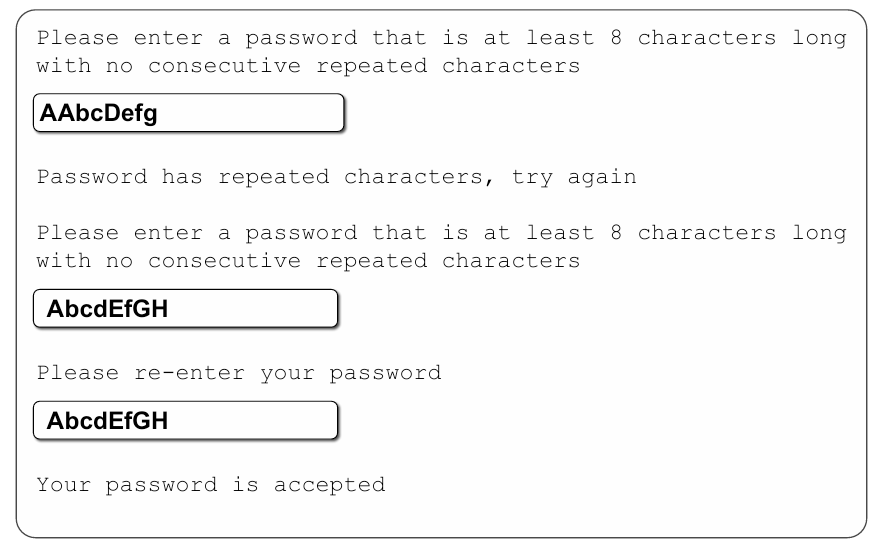
Correct use of string manipulation functions: checking length ≥ 8 using lenString correctly; correct use of subString to check for recurring adjacent characters.
Correct first input of password; use of flag to prevent further checks if length fails; loop to check for recurring adjacent characters; flag to prevent final checks if repeated-character check fails; correct repeat input for password; correct check that both entries match; appropriate output throughout; correct method to restart if any check fails.
FAIL = true
loop while FAIL = true
    FAIL = false
    output "Please enter a password that is at least 8 characters long with no consecutive repeated characters"
    input PW
    if lenString(PW) < 8 then
        output "Password is too short, try again"
        FAIL = true
    end if
    if FAIL = false then
        POS = 0
        loop while POS < lenString(PW) - 1
            if subString(PW, POS, 1) = subString(PW, POS + 1, 1) then
                FAIL = true
                POS = lenString(PW) - 1
                output "Password has repeated characters, try again"
            end if
            POS = POS + 1
        end loop
    end if
    if FAIL = false then
        output "Please re-enter your password"
        input PW2
        if PW <> PW2 then
            output "Your password re-entry does not match, try again"
            FAIL = true
        else
            output "Your password is accepted"
        end if
    end if
end loop
The outer loop keeps repeating the whole process until all checks pass (FAIL stays false). First it checks length; if that fails, it skips the remaining checks by testing FAIL before each. Then it loops character-by-character comparing adjacent characters using subString; if any two consecutive characters match, it sets FAIL and exits the inner loop early. Finally, it asks for a re-entry and checks both passwords match before accepting.