
Question 1
Most-appropriate topic codes (IB Computer Science):
• Topic 2.1 — Computer organization
▶️ Answer/Explanation
Answer:
Two features of an application interface include Graphical User Interface (GUI) elements (like menus, buttons, and icons) and command-line interfaces for text-based input.
Detailed Solution:
When we look at how users actually interact with software, the application interface acts as the essential bridge between human and machine. Typically, the most recognizable feature is the GUI, which provides visual cues like toolbars, dropdown menus, and clickable buttons to make navigation intuitive. Another important feature is the layout or screen structure, which organizes information hierarchically so users don’t get overwhelmed. Under the hood, interfaces might also offer keyboard shortcuts or text-based command lines for power users. Ultimately, these elements are all designed to make the software accessible, functional, and user-friendly, ensuring that inputs are seamlessly translated into actions.
Question 2
Most-appropriate topic codes (IB Computer Science):
• Topic 2.1 — Computer organization
▶️ Answer/Explanation
(a) Answer:
Secondary memory provides non-volatile, long-term storage for data and programs, ensuring that information is not lost when the computer is powered off.
Detailed Solution:
Think of secondary memory like the long-term filing cabinet of a computer system. Unlike primary memory (RAM), which gets completely wiped the second you pull the plug, secondary storage holds onto everything permanently. It is where your operating system, installed applications, and personal files like photos and documents live. Without it, you would literally have to reinstall everything from scratch every single time you booted up the machine. Even though it’s much slower than RAM, its massive capacity and non-volatile nature make it absolutely critical for everyday computing.
(b) Answer:
This happens when virtual memory is utilized. If the computer’s primary memory (RAM) is full, the operating system uses a portion of the secondary memory as temporary RAM to keep active programs running.
Detailed Solution:
Imagine you are working on a massive video editing project while simultaneously running a dozen browser tabs and playing music. Your computer’s physical RAM is like a desk, and eventually, that desk gets completely covered up. When this happens, the operating system steps in and cleverly carves out a chunk of your hard drive or SSD to act as “virtual memory.” It swaps out data that isn’t being actively used right this second onto the disk to free up space on the desk. While relying on secondary memory like this slows things down because disk speeds are slower than RAM, it beautifully prevents the entire system from crashing due to a lack of memory.
Question 3
Most-appropriate topic codes (IB Computer Science):
• Topic 2.1 — Computer organization
▶️ Answer/Explanation
Answer:
1. Upgrading RAM (Random Access Memory) allows the computer to store more data from active applications simultaneously, reducing reliance on slower virtual memory.
2. Replacing a traditional HDD (Hard Disk Drive) with an SSD (Solid State Drive) significantly increases data read/write speeds, resulting in faster boot times and quicker application loads.
Detailed Solution:
When a desktop starts feeling sluggish, tackling the hardware is often the best fix. The most immediate impact usually comes from bumping up the RAM; it literally gives your CPU more breathing room to juggle active tasks without having to desperately swap data back and forth to the hard drive. Another massive game-changer is ditching an old mechanical spinning hard drive for a modern Solid State Drive (SSD). Since SSDs have no moving parts and use flash memory, the system can fetch data, launch massive applications, and boot up the operating system in a fraction of the time. Together, these two upgrades breathe entirely new life into aging desktop architecture without having to buy a whole new machine.
Question 4
Most-appropriate topic codes (IB Computer Science):
• Topic 1.2 — System design basics
▶️ Answer/Explanation
Answer:
1. Surveys allow data to be collected from a very large number of users quickly and simultaneously, making it time-efficient.
2. The responses can be made anonymous, which encourages users to provide more honest and critical feedback about the system’s flaws without fear of judgment.
Detailed Solution:
Gathering requirements for a new system is tricky, but surveys are an incredibly powerful tool for the job. First of all, they scale beautifully; instead of spending weeks conducting one-on-one interviews, an analyst can blast out a digital survey to hundreds or thousands of employees globally in a matter of seconds. It’s a huge time-saver for large organizations. On top of that, because surveys can be totally anonymous, people are far more likely to be brutally honest about what they hate about the current system. You get the raw, unfiltered truth about bottlenecks and missing features, which gives the development team exactly the hard data they need to build something that actually solves real-world problems.
Question 5
$X = \text{NOT } A \text{ OR } B \text{ AND } C \text{ OR NOT } B$
Most-appropriate topic codes (IB Computer Science):
• Topic 2.1 — Computer organization
▶️ Answer/Explanation
Answer:
To construct the table, respect standard Boolean precedence (NOT, then AND, then OR). 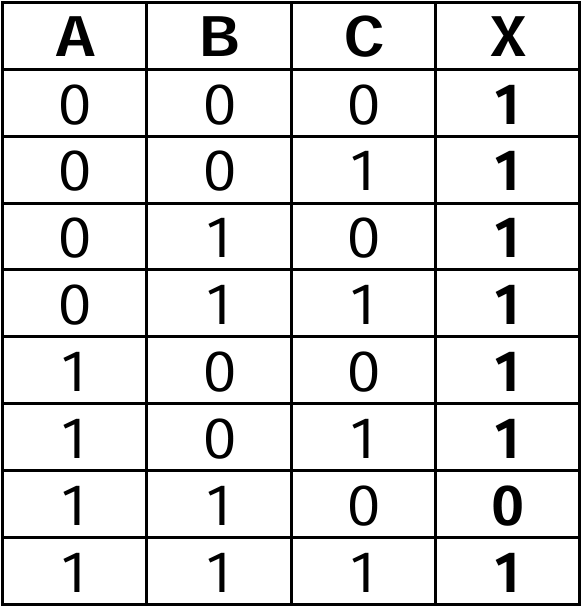
Detailed Solution:
Building a truth table for a three-variable expression can look daunting at first, but it is super manageable if you break it down step by step based on order of operations. First, you set up the eight possible combinations for variables A, B, and C (from 000 up to 111). Following the rules of Boolean algebra, you handle the NOTs first, creating columns to flip the values of A and B. Next, you tackle the AND operation, which is multiplying the B and C columns together. Finally, you sweep through with the OR operations, taking the results of $\text{NOT } A$, $(B \text{ AND } C)$, and $\text{NOT } B$ and evaluating if at least one of them is true. If any of those three sub-expressions is a 1, your final output X is a 1, which happens in nearly every case here except for when A is 1, B is 1, and C is 0!
Question 6
Most-appropriate topic codes (IB Computer Science):
• Topic 1.1 — Systems in organization
▶️ Answer/Explanation
Answer:
Two methods of implementing a new computer system are direct changeover and parallel running.
Detailed Solution:
When an organization decides to roll out a brand-new computer system, they have a few different strategic methods to make the switch depending on their risk tolerance. They could go with a “direct changeover,” which basically means pulling the plug on the old system and immediately starting fresh with the new one—it’s risky but incredibly fast! Alternatively, “parallel running” involves operating both the old and new systems side-by-side for a given period to ensure everything works perfectly before fully transitioning. Other safe bets include a “phased conversion” (rolling out the system piece by piece) or “pilot running” (testing it out in just one specific department first to iron out bugs).
Question 7
Most-appropriate topic codes (IB Computer Science):
• Topic 3.1 — Networks
▶️ Answer/Explanation
Answer:
A DNS (Domain Name System) server resolves human-readable domain names (like www.example.com) into IP addresses (like 192.0.2.1) so that computers can locate and route traffic to the correct web servers.
Detailed Solution:
Think of a DNS server as the ultimate phonebook of the internet. We humans are great at remembering catchy website names like google.com or amazon.com, but computers and routers only understand numbers, specifically IP addresses. When you type a URL into your browser, the DNS server instantly looks up that domain name and finds its matching IP address in its massive database. It then directs your computer to the exact server where that website lives, seamlessly bridging the gap between human language and machine routing without you ever noticing the complex translation happening behind the scenes.
Question 8
Most-appropriate topic codes (IB Computer Science):
• Topic 3.1 — Networks
▶️ Answer/Explanation
Answer:
A VPN is used to encrypt internet traffic and mask a user’s IP address. This provides secure, private access to a remote network (like a corporate office) over a public internet connection, preventing unauthorized interception of sensitive data.
Detailed Solution:
One of the biggest reasons people rely on a VPN is to keep their online activity totally private and secure, especially when they are connected to untrusted public networks like at a coffee shop or an airport. Without a VPN, malicious actors on the same network could potentially intercept your sensitive data, like passwords or banking info. A VPN solves this by creating a secure, encrypted tunnel for your internet traffic, essentially scrambling the data so that even if someone does manage to intercept it, it looks like absolute gibberish. Plus, it hides your real IP address, allowing remote workers to safely access their company’s internal servers as if they were sitting right in the office.
Question 9
Most-appropriate topic codes (IB Computer Science):
• Topic 1.1 — Systems in organization
• Topic 2.1 — Computer organization
• Topic 3.1 — Networks
▶️ Answer/Explanation
(a)(i) Answer:
CAD (Computer-Aided Design) software is a specialized application used to create, modify, analyze, and optimize 2D drafting or 3D models.
Detailed Solution:
When professionals need to draft precise blueprints or 3D structural models, they turn to CAD software instead of traditional pen and paper. It is essentially an incredibly powerful digital drafting board that allows an architect to build models with exact mathematical precision. This type of software replaces manual drafting and comes packed with tools to simulate real-world physics, making the design process exceptionally robust and accurate.
(a)(ii) Answer:
1. CAD allows the architect to quickly edit and modify designs without having to redraw the entire plan from scratch.
2. It enables the creation of high-quality 3D visualizations, allowing clients to virtually explore the project before any physical construction begins.
Detailed Solution:
Using CAD is an absolute lifesaver for an architect because it makes revisions practically effortless; if a client suddenly wants to move a wall, the architect can just click and drag rather than throwing away a massive sheet of paper. Beyond just saving immense amounts of time on edits, CAD software allows architects to render stunning, photorealistic 3D environments. This means they can take their clients on a virtual walkthrough of the building, which is huge for securing project approvals and ensuring everyone understands the final vision.
(b) Answer:
Data compression algorithms reduce the overall file size by removing redundant data. This is necessary because smaller files take up less space on the architect’s hard drive and require significantly less bandwidth, allowing for much faster upload and transfer speeds over the internet to clients.
Detailed Solution:
Architectural CAD files and high-res renders are notoriously massive, often taking up gigabytes of space. If an architect tries to store hundreds of these raw files, her computer’s hard drive will fill up incredibly fast! Data compression software tackles this bottleneck by using clever algorithms to shrink the file size down to something much more manageable. This is especially crucial when emailing or uploading these designs, as compressed files consume far less internet bandwidth and transfer in a fraction of the time, keeping her business communications incredibly efficient.
(c)(i) Answer:
The architect could minimize downtime by utilizing a real-time cloud backup service or employing a RAID setup (like RAID 1 for mirroring). If the local disk fails, she can immediately switch to a secondary machine and access her synced files from the cloud to continue working without waiting for data recovery.
Detailed Solution:
Hardware failures are a nightmare for any solo business, but an architect can absolutely save herself from catastrophic downtime by being proactive. The best strategy is setting up an automated cloud backup system that constantly saves her work off-site in real-time. If her local hard drive completely dies, she doesn’t have to panic; she can simply grab a temporary laptop, log into her cloud account, and immediately pick up right where she left off. Alternatively, running a RAID 1 setup would instantly mirror her data onto a secondary drive inside her PC, meaning if one drive fails, the system just keeps running normally.
(c)(ii) Answer:
1. Human error, such as accidentally deleting an important project file or formatting the wrong storage drive.
2. Malicious software, such as ransomware or viruses, which can infect the computer and corrupt or encrypt the files so they become inaccessible.
Detailed Solution:
Even with the most expensive, flawless hardware in the world, data is never 100% safe from loss. The most common culprit is actually just simple human error—we have all had that heart-dropping moment where we accidentally hit “delete” on the wrong folder and emptied the trash bin before realizing our mistake. Another terrifying and increasingly common threat is malware attacks. If an architect accidentally clicks a sketchy email link from an unknown sender, a virus can silently infect her system and maliciously encrypt all her CAD files, holding her life’s work hostage.
Question 10
Most-appropriate topic codes (IB Computer Science):
• Topic 1.1 — Systems in organization
• Topic 3.1 — Networks
▶️ Answer/Explanation
(a) Answer:
Different access levels can be implemented by assigning unique user IDs and passwords to everyone, paired with a Role-Based Access Control (RBAC) system. Network administrators would be granted full read, write, and execute permissions to manage the entire server and user accounts. Teachers could be given read/write access to educational files and limited access to student records. Students would receive read-only access for general educational materials and write access only for their personal folders. Guests would be isolated entirely from the file server, given access only to the internet via a separate Virtual LAN (VLAN).
(b)(i) Answer:
A fibre optic cable connection.
(b)(ii) Answer:
1. Implementing a hardware and software firewall to monitor and filter incoming and outgoing network traffic.
2. Using a proxy server to hide the internal IP addresses of the school’s devices from the external internet.
(c) Answer:
1. Increased risk of malware or phishing attacks if a user clicks on a malicious link.
2. Instances of cyberbullying or inappropriate communication between students.
3. Wasted storage space and network bandwidth due to students sending non-academic, large personal files or spam.
Detailed Solution:
When managing a school network, security and proper access control are absolutely vital because you’re dealing with incredibly sensitive personal and financial data. You definitely don’t want a curious student stumbling into the school’s financial records! By setting up group policies, an admin can logically separate users—giving teachers the tools they need to upload grades while restricting guests to just basic internet access. To keep the whole system safe from outside hackers, a robust firewall acts as a digital bouncer, inspecting every packet of data. Lastly, giving out emails to everyone sounds great for communication, but it opens a massive can of worms regarding phishing risks and network abuse, requiring constant monitoring by the IT team.
Question 11
Most-appropriate topic codes (IB Computer Science):
• Topic 7.1 — Control
▶️ Answer/Explanation
(a)(i) Answer:
An embedded system is a specialized computer system, featuring a dedicated combination of hardware and software, designed to perform one specific function within a larger mechanical or electrical system.
(a)(ii) Answer:
1. Modern washing machines.
2. Microwave ovens.
(b) Answer:
An advantage of a central computer is that it can optimize traffic flow globally across the entire city, synchronizing lights during rush hour to reduce congestion. However, a major disadvantage is that it introduces a single point of failure; if the central computer crashes or the network goes down, all the traffic lights in the city could fail simultaneously, causing massive gridlock.
(c) Answer:
1. Inductive loop sensors (embedded in the road).
2. Infrared or visual camera sensors.
(d) Answer:
An interrupt is a hardware-generated signal sent to the CPU when a device requires immediate attention, whereas polling is a software-driven process where the CPU continuously checks the status of devices to see if they need attention.
(e) Answer:
Real-time information allows drivers to dynamically re-route their journeys to avoid unexpected traffic jams, accidents, or road closures. This significantly reduces their overall travel time, lowers frustration, and decreases vehicle fuel consumption and emissions from idling in traffic.
Detailed Solution:
Embedded systems are the invisible computers running our modern world, quietly doing highly specific tasks like running a washing machine cycle or switching a traffic light from red to green. Moving control from these isolated local systems to a massive central computer offers a brilliant “big picture” view, allowing city planners to create perfect green-light waves during rush hour. However, it’s a huge technical risk—if that central server dies, the entire city could be thrown into chaos! To make smart decisions, the system relies on physical sensors buried in the asphalt or cameras mounted on poles to count cars. When this data is fed into navigation apps, everyday drivers get the magical ability to dodge traffic jams entirely, saving them time, fuel, and a whole lot of road rage.
Question 12
(a) Consider the following recursive function:
recfn (N)
    if N <= 0
    then
        return 0
    else
        if N mod 2 == 0
        then
            return recfn(N - 1) - N
        else
            return recfn(N - 1) + N
        endif
    endif
end recfn
Determine the value of variable x after execution of the following program statement:
$x = \text{recfn}(5)$
Show all your working.
Most-appropriate topic codes (IB Computer Science):
• Topic 4.1 — General principles
• Topic 5.1 — Abstract data structures
▶️ Answer/Explanation
(a) Answer:
Working out the recursion stack for $x = \text{recfn}(5)$:
$N=5$ (odd): returns $\text{recfn}(4) + 5$
$N=4$ (even): returns $\text{recfn}(3) – 4$
$N=3$ (odd): returns $\text{recfn}(2) + 3$
$N=2$ (even): returns $\text{recfn}(1) – 2$
$N=1$ (odd): returns $\text{recfn}(0) + 1$
$N=0$: reaches base case, returns $0$.
Now, trace back up:
$\text{recfn}(1) = 0 + 1 = 1$
$\text{recfn}(2) = 1 – 2 = -1$
$\text{recfn}(3) = -1 + 3 = 2$
$\text{recfn}(4) = 2 – 4 = -2$
$\text{recfn}(5) = -2 + 5 = 3$
Final value of $x$ is 3.
(b) Answer:
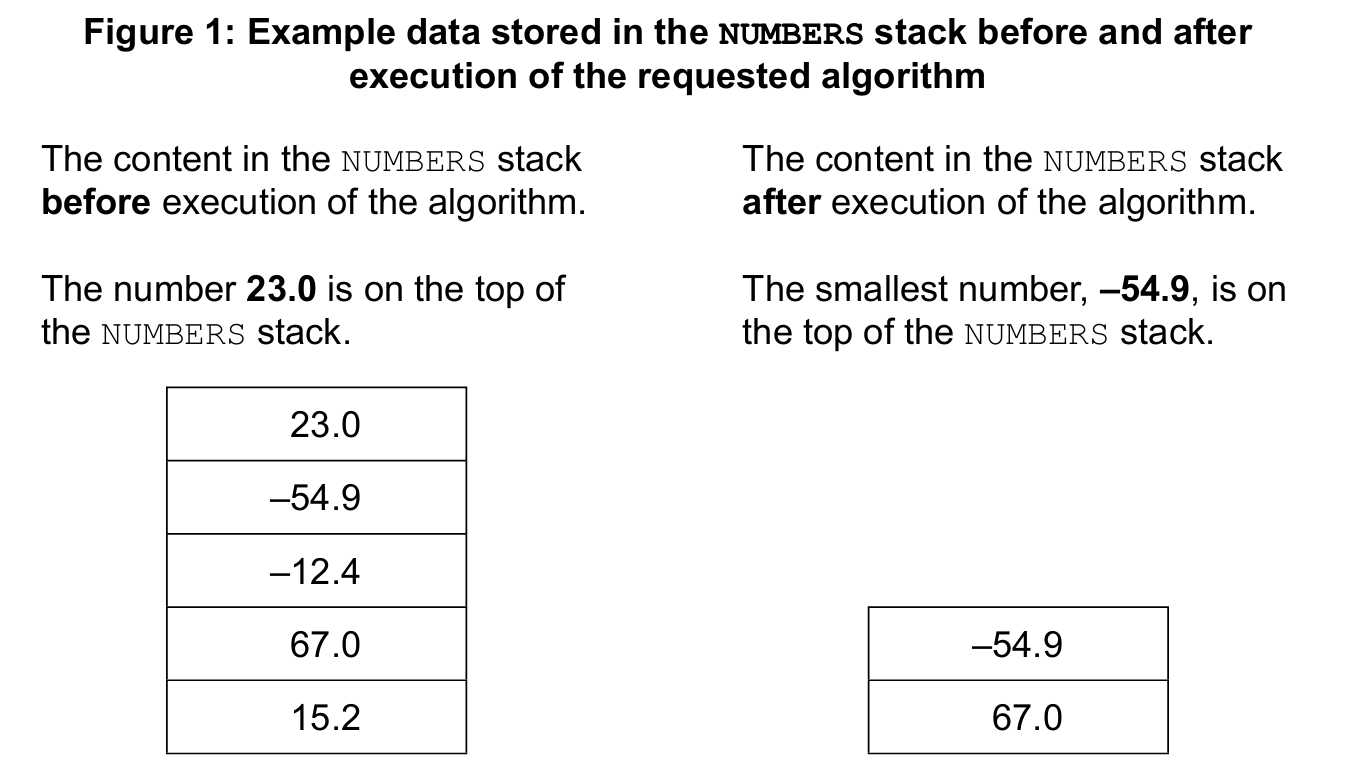
1. push(item): Adds a new data element onto the top of the stack.
2. pop(): Removes and returns the top-most data element from the stack.
(c) Answer:
if not NUMBERS.isEmpty() then
    VAL = NUMBERS.pop()
    MAX = VAL
    MIN = VAL
    loop while not NUMBERS.isEmpty()
        VAL = NUMBERS.pop()
        if VAL > MAX then
            MAX = VAL
        end if
        if VAL < MIN then
            MIN = VAL
        end if
    end loop
    NUMBERS.push(MAX)
    NUMBERS.push(MIN)
end if
Detailed Solution:
Tracing a recursive function is like tumbling down a rabbit hole and then climbing back up. You follow the function calls all the way down to the base condition (when N hits 0), and then you substitute the returned values back up the chain step-by-step. It requires patience and careful attention to the alternating addition and subtraction. For the stack algorithm, think of a stack as a literal stack of plates; you can only interact with the very top plate. To find the biggest and smallest numbers, we have to “pop” every single number off the stack one by one, constantly comparing them to our current max and min variables. Once the stack is completely empty, we simply “push” the max and min values back onto the top, leaving the stack exactly as the prompt requested.
Question 13
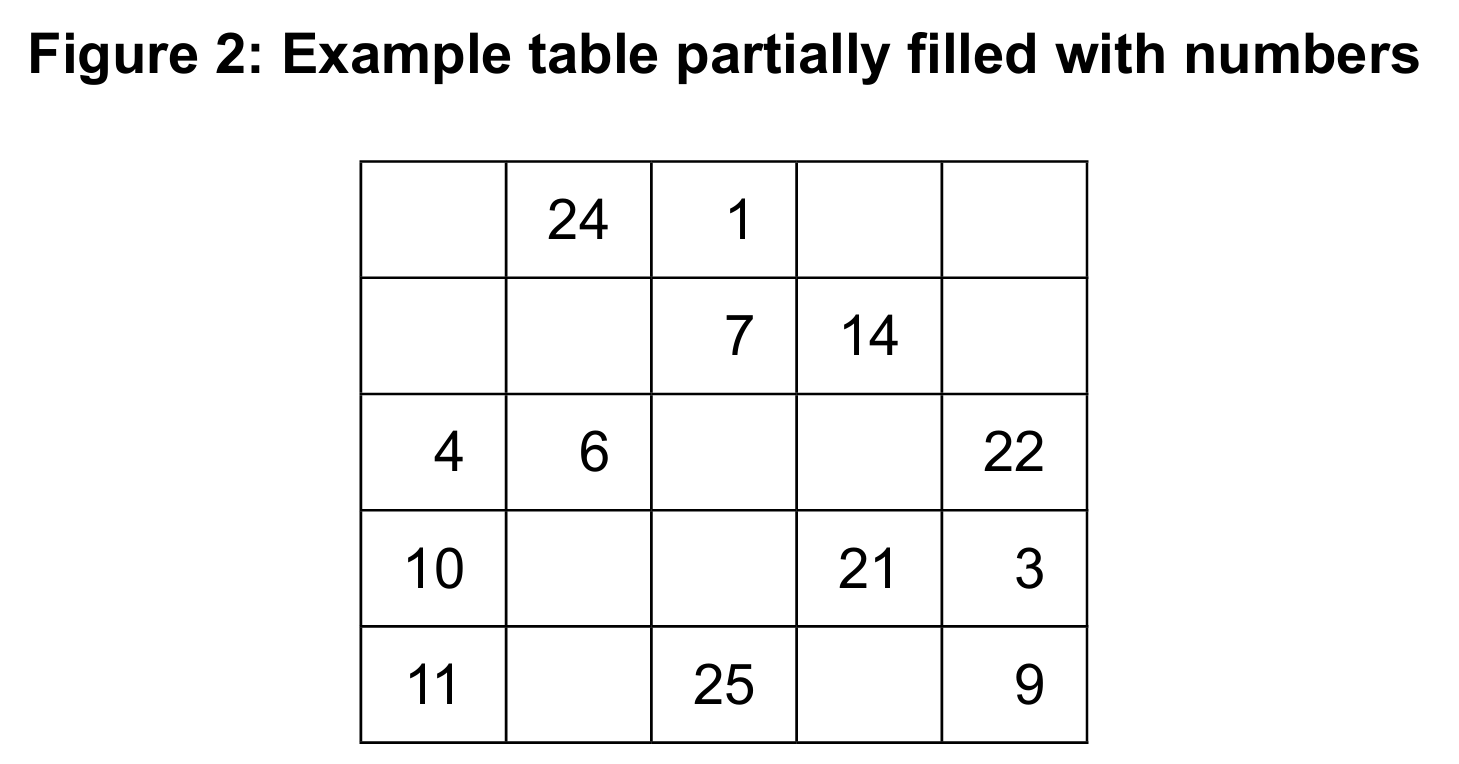
– Initialize a one-dimensional array, FLAGS, with zero (0) values.
– Visit all elements of the MAT array.
– Use the number stored in the MAT array to match up the index in the FLAGS array.
– Assign one (1) to the FLAGS array at that index.
– Inspect elements of the FLAGS array.
– If all the elements in the FLAGS array are one (1), output a message saying that the table has been completed correctly; otherwise, output a message saying that the table has not been completed correctly.
Most-appropriate topic codes (IB Computer Science):
• Topic 4.1 — General principles
• Topic 4.3 — Introduction to programming
▶️ Answer/Explanation
(a) Answer:
1. Concurrent development: Different team members can work on different sub-programs at the same time.
2. Reusability: A sub-program can be called multiple times throughout the main program without rewriting the code.
3. Easier debugging: If an error occurs, it is much easier to test and fix an isolated sub-program than to hunt down a bug in a massive single block of code.
(b) Answer:
sub inputInRange()
    isValid = false
    loop while isValid == false
        output "Enter a number: "
        input N
        if N >= 1 and N <= 25 then
            output "Your number is valid."
            isValid = true
            return N
        else
            output "The number is not in the range from 1 to 25. Please try again."
        end if
    end loop
end sub
(c) Answer:
sub isCorrectlyCompleted(MAT)
    FLAGS = new Array(26)
    for i = 0 to 25
        FLAGS[i] = 0
    end for
for row = 0 to 4
for col = 0 to 4
num = MAT[row][col]
if num >= 1 and num <= 25 then
FLAGS[num] = 1
end if
end for
end for
allCorrect = true
for k = 1 to 25
if FLAGS[k] == 0 then
allCorrect = false
end if
end for
if allCorrect == true then
output “The table has been completed correctly.”
else
output “The table has not been completed correctly.”
end if
end sub
Detailed Solution:
Breaking a large program into sub-programs (or functions) is a core principle of good software engineering, acting essentially as a way to divide and conquer a big project among multiple teammates. The inputInRange loop is a classic validation trap; it constantly badgers the user for an input and absolutely refuses to break the loop or return a value until the kid enters a valid integer between 1 and 25. The logic for isCorrectlyCompleted is essentially a clever “checklist.” We initialize a 1D array of flags all set to 0. Then, we use nested loops to iterate over every single slot in the 2D grid. Whenever we find a number, we use that number as an index to tick off the corresponding flag (setting it to 1). If the kid duplicated numbers or skipped any, at least one flag in the checklist will still be a 0 by the end of the process, triggering the failure message!