
Question 1
Most-appropriate topic codes (IB Computer Science SL):
• Topic $1.1$ — Systems in organizations (Parts $\mathrm{(a)}$ and $\mathrm{(b)}$)
▶️ Answer/Explanation
(a)
For the correct answer (any one):
Easily deployable and can be implemented on demand; / Cost effective — flexible payment methods such as pay-as-you-go models; / Can be accessed anywhere/anytime/from any device; / Software is always up to date at the supplier’s side without needing to install patches; / Scalability — can increase or reduce subscription very quickly; / Technical support provided by the provider.
SaaS is like renting software instead of buying it outright — you get all the benefits without the upfront cost or maintenance burden. The software runs on the provider’s servers, so your organization avoids expensive hardware investments and IT maintenance. Accessibility is another key benefit: any device with an internet connection can run the software, making collaboration seamless across locations.
(b)
For the correct answer (any one):
Confidentiality concerns if customer data is stored on the supplier’s hardware; / Stability/latency issues — dependence on a good quality internet connection; / If the service shuts down, you can lose your applications and data; / Critical business functions left in the control of a third party; / Limited customization; / Security concerns — higher risk of attack/interception.
The fundamental drawback is loss of control — your data and software sit on someone else’s servers. If the provider’s connection drops or they go out of business, your operations halt entirely. Sensitive customer data is also at risk, as a breach on the provider’s side can expose your organization without it having done anything wrong.
Question 2
Most-appropriate topic codes (IB Computer Science SL):
• Topic $1.1$ — Systems in organizations
▶️ Answer/Explanation
For the correct answer:
One area / branch of the business is selected to try the new computer system ; once the new system is fully tested and able to function correctly / without errors / as per user requirements, it is implemented for everyone.
Pilot running is essentially a “try it before you fully commit” strategy. Instead of switching every single user across to the new system on day one — which could cause a company-wide disaster if something goes wrong — you pick one department or office to go live first. That group uses the real, live new system while everyone else carries on as normal with the old one. Any bugs, training gaps or workflow issues that appear only affect a small slice of the organisation. Once those problems have been ironed out based on real feedback, you can confidently roll the system out to the rest of the company knowing it actually works. It is slower than a direct changeover, but far less risky.
Question 3
Most-appropriate topic codes (IB Computer Science SL):
• Topic $1.1$ — Systems in organizations
▶️ Answer/Explanation
Answer:
User acceptance testing evaluates a product/software to make sure it meets specifications/user requirements/functions as intended; before putting it into production/before release. It serves as a quality check to identify problems and defects through user feedback, ensuring bug fixes can be completed in a more cost-effective manner.
UAT is the final gate before software is released — real end-users test the system under conditions that mirror actual use to confirm it does what was specified. Any gaps between what was built and what was needed are caught here, where they are far cheaper to fix than after go-live. It ultimately protects both the developer and the client from delivering a product that fails in the real world.
Question 4
Most-appropriate topic codes (IB Computer Science SL):
• Topic $1.1$ — Systems in organizations
▶️ Answer/Explanation
For the correct answer (any two):
On a CD / DVD / Blu-ray disc / flash drive; or (In-built) Help files; or Website / Online support (FAQs / chat sessions) / Video demonstrations; or Printed manuals / PDFs.
There are several established ways to get documentation into the hands of users. The most traditional approach is the printed manual — a physical booklet shipped with the product. In the modern era, built-in help files (accessible from within the software itself, usually via a Help menu or pressing F1) are extremely common because they are searchable and always available without needing a separate document. Online support portals, FAQ pages, and video tutorials have become increasingly popular because they can be updated instantly whenever the software changes and can be accessed from any device with internet access. Any two of these represent valid methods that an examiner would accept.
Question 5
Most-appropriate topic codes (IB Computer Science SL):
• Topic $1.1$ — Systems in organizations
▶️ Answer/Explanation
For the correct answer (any one method):
Self-instruction / Self-study: the user works through documentation / watches instructional videos / learns features of the application by themselves; or Formal classes / Instructor-led training: organised sessions in which a tutor trains a class of users in specific features of the application or system; or Online training / Distance training: users are trained remotely using digital training materials designed to show them how to use the application or system.
Take formal instructor-led training as a clear example. A trainer stands in front of a group of employees (either in a classroom or over a video call) and takes them through the key features of the new system in a structured, step-by-step way. Users can ask questions in real time, which is one of its biggest advantages over self-study. The trainer can also adapt the session on the fly if the group is struggling with a particular concept. This method tends to be more expensive than simply handing everyone a manual, but the immediate feedback loop means users are far more likely to leave feeling genuinely confident about using the new system.
Question 6
Most-appropriate topic codes (IB Computer Science SL):
• Topic $1.2$ — System design basics
▶️ Answer/Explanation
Answer:
A hardware device that is connected to/attached to/external to/auxiliary to the computer; OR a device used for input, output or storage that is external/attached to a computer.
A peripheral sits on the “edge” of the computer system — it is not part of the core CPU or its internal memory, but connects to provide input (keyboard, mouse), output (monitor, printer), or storage (USB drive). These devices extend what the computer can do but are not required for the CPU itself to function internally. Common examples include keyboards, monitors, scanners, and external hard drives.
Question 7
Most-appropriate topic codes (IB Computer Science SL):
• Topic $1.2$ — System design basics
▶️ Answer/Explanation
Answer (any two):
Very small text and readability; / Very small functional elements / difficult to navigate; / Clutter on the screen; / Low contrast between text and functional elements / poor colour choices for visibility; / Size of screen (difficult to see in poor light); / Size of keys (difficult to access functions); / Battery life (may need to recharge frequently); / Touch screen keys (lack of tactile feedback); / Gesture (unresponsive gestures in user interfaces); / Too many clicks to complete tasks; / Limited storage/RAM.
Cell phones pack a full computing experience into a tiny form factor, which creates inevitable usability trade-offs. Small touch targets mean fingers — far less precise than a mouse — frequently tap the wrong element. Touchscreens also lack tactile feedback, so users cannot feel whether a key registered and must visually confirm every interaction, slowing them down and increasing error rates.
Question 8
Most-appropriate topic codes (IB Computer Science SL):
• Topic $1.2$ — System design basics
▶️ Answer/Explanation
Answer (any two):
Use of touch screen; / Voice recognition; / Braille keyboards; / Text-to-speech/screen readers; / Hotkeys; / Larger screens; / Larger text options; / Size and sensitivity of touchpad — larger/less sensitive touchpads.
Accessibility features ensure that users with physical or sensory impairments are not excluded. Voice recognition removes the need for fine motor control, letting users dictate commands instead of typing. Text-to-speech/screen readers convert on-screen content into audio so visually impaired users can navigate and consume information without seeing the display. Both are well-established examples of inclusive design.
Question 9
Most-appropriate topic codes (IB Computer Science SL):
• Topic $2.1$ — Computer organization (Parts $\mathrm{(a)}$, $\mathrm{(b)}$)
▶️ Answer/Explanation
(a)
For the correct answer:
To hold the data / instructions [1]; to be transferred/fetched to/from the main memory / RAM of the computer (that has been read or needs to be written), using the address from the MAR.
The MDR acts as a temporary holding buffer sitting between the CPU and main memory. Whenever the CPU needs to read something from RAM, the memory address register (MAR) first specifies which memory location to look at, and then the data at that location is placed into the MDR, ready to be passed into the CPU for processing. Similarly, when the CPU wants to write data back to RAM, it first places the data in the MDR and then the MAR specifies where in RAM it should go. Think of the MDR as the “delivery dock” — every piece of data travelling in or out of main memory must pass through it.
(b)
For the correct answer:
The ALU performs simple arithmetic operations / mathematical calculations (addition, subtraction, multiplication, division) [1]; and logical comparisons / AND, OR and NOT operations.
The ALU is the computational heart of the CPU — it is the component that actually does the maths and makes decisions. Every time a program adds two numbers together, compares whether one value is greater than another, or applies a logical condition (like checking whether a variable is both greater than 10 AND less than 50), that operation is physically executed by the ALU. While it only performs relatively simple operations, the sheer speed at which it performs them — billions of times per second in modern processors — is what makes complex software possible.
Question 10
Most-appropriate topic codes (IB Computer Science SL):
• Topic $2.1$ — Computer organization (Parts $\mathrm{(a)}$, $\mathrm{(b)}$)
▶️ Answer/Explanation
(a)
For the correct answer: $00100101$ (also accepted: $100101$ or $0100101$)
We identify which powers of 2 sum to 37: $32 + 4 + 1 = 37$, corresponding to bit positions 5, 2, and 0. In 8-bit form this gives $00100101_{2}$. Verification: $32 + 4 + 1 = 37$ ✓. All other bit positions are 0.
(b)
For the correct answer: $\text{9E}$
Split $10011110$ into two nibbles from right to left: $1001\ |\ 1110$. Convert each nibble: $1001_{2} = 9_{16}$ (since $8+1=9$) and $1110_{2} = \text{E}_{16}$ (since $8+4+2=14$). Therefore $10011110_{2} = \text{9E}_{16}$.
Question 11
Most-appropriate topic codes (IB Computer Science SL):
• Topic $2.1$ — Computer organization
▶️ Answer/Explanation
For the correct answer:
RAM is a volatile / temporary memory (which stores data only as long as power is supplied) whereas ROM is a permanent / non-volatile memory (which retains data even when power is turned off); or Data stored in RAM can be altered whilst data stored in ROM can only be read; or RAM is used to store instructions / data / programs currently being processed whereas ROM is used to store permanent data such as start-up instructions for the computer; or RAM has a larger physical chip size / higher capacity / is more expensive whilst ROM is smaller / less capacity / cheaper.
The two main types of primary memory are RAM (Random Access Memory) and ROM (Read-Only Memory), and they serve very different purposes. RAM is where the computer stores everything it is currently working on — your open tabs, running applications, files you are editing — but the moment you switch the power off, all of that disappears because RAM is volatile. ROM, on the other hand, permanently stores the firmware that the computer needs to start itself up (the BIOS/UEFI), and this data survives power-offs because ROM is non-volatile. In other words, RAM is your working desk and ROM is a notice board with instructions that are always there, no matter what.
Question 12
Most-appropriate topic codes (IB Computer Science SL):
• Topic $3.1$ — Networks
▶️ Answer/Explanation
For the correct answer (any two):
Physical Layer; or Data Link Layer; or Network Layer; or Transport Layer; or Session Layer; or Presentation Layer; or Application Layer.
The OSI model is a conceptual framework that divides network communication into seven distinct layers, each responsible for a specific aspect of the process of getting data from one computer to another. From bottom to top they are: Physical (actual bits on the wire), Data Link (node-to-node delivery, MAC addressing), Network (routing between networks, IP addressing), Transport (end-to-end delivery, TCP/UDP), Session (managing connections), Presentation (data format translation, encryption), and Application (the interface with software, e.g. HTTP, FTP). Any two of these seven names would earn full marks. The layered approach means that a problem at one layer (say, a physical cable fault) can be diagnosed and fixed without needing to redesign higher-level protocols.
Question 13
(a) (i) Identify two characteristics of fibre optic cables as a transmission medium.
(a) (ii) Identify two characteristics of wireless transmission.
(b) Describe how encryption is used to protect data during transmission.
(c) Explain how data is transmitted using packet switching.
(d) Explain one social implication of changes to working patterns due to the use of a virtual private network (VPN).
Most-appropriate topic codes (IB Computer Science SL):
• Topic $3.1$ — Networks (Parts $\mathrm{(a)(i)}$ to $\mathrm{(d)}$)
▶️ Answer/Explanation
(a)(i)
For the correct answer (any two):
Allows very fast transmission of data / extremely high bandwidth possible; / Immune to electromagnetic interference / temperature changes / severe weather / highly resistant to noise and moisture; / Very high security rating; / Very long distance of transmission before requiring repeaters / attenuation; / Long lifespan (thinner and lightweight, so more flexible than other media); / Expensive / harder to install.
Fibre optic cables transmit data as pulses of light through glass or plastic fibres, which gives them extraordinary bandwidth and makes them immune to electromagnetic interference. Because light doesn’t degrade as quickly as an electrical signal, these cables can carry data over very long distances before needing repeaters.
(a)(ii)
For the correct answer (any two):
Uses radio waves / electromagnetic waves to transfer data; / Transmission speed of data is limited; / Range / reliability can be affected by distance from access point / number of other users / obstacles; / Inexpensive to install / no need to spend on cabling; / Security can be poor (unless encryption is applied) / subject to eavesdropping/interception; / Allows users to move around without losing network access.
Wireless transmission uses radio waves so no physical cables are needed, making it easy to add devices and allowing users to roam freely. However, signal quality degrades with distance, physical obstacles, and network congestion, and the open-air broadcast nature makes it inherently more vulnerable to eavesdropping than wired connections.
(b)
For the correct answer:
Plain text is changed to cipher text / data is scrambled using an encryption algorithm/key / a key is required by sender and receiver for authentication; / Cipher text/data cannot be understood if intercepted; / The cipher text/data is then decrypted using a (decryption) key when received by the receiver.
Before data is sent, an encryption algorithm uses a key to scramble the original plaintext into unreadable cipher text. Even if an attacker intercepts the data in transit, they see only meaningless characters without the correct key. At the receiving end, the recipient uses a matching decryption key to reverse the process and recover the original data.
(c)
For the correct answer :
The whole data is split into (fixed/equal) sized chunks/packets; / Each packet has a header, payload and trailer; / Packet contains information such as source address, destination IP address, packet number, protocol, checksum, payload/data, CRC etc. (at least two); / Packets may take different routes to the destination; / If a route becomes unavailable, individual packets can be re-routed; / Packets may arrive at the destination out of order; / Packets are re-ordered/joined together at the destination; / Missing packets can be re-sent.
In packet switching, large data is broken into small, equal-sized packets each labelled with a header containing source/destination IP addresses and a sequence number. Routers independently forward each packet along the fastest available route, so different packets of the same message may travel via completely different paths. At the destination, packets are reassembled in the correct order using their sequence numbers, and any missing packets are re-requested and re-sent.
(d)
For the correct answer:
Example 1 — Positive: Improved work/life balance; working from home / access to work materials has become much easier/more secure, allowing more time spent at home; time saved not commuting can be spent with family/hobbies; flexible hours reduce stress, improving mental health.
Example 2 — Negative: Negative impact on work/life balance; employers may have higher expectations because the employee has saved commuting time; workers may feel they cannot switch off or that they are not trusted to be productive at home, leading to poorer mental health.
Example 3 — Isolation: Working from home may result in less collaboration/teamwork; different time zones may prevent effective communication; feelings of isolation can affect mental health and productivity.
VPNs enable employees to securely access company networks from anywhere, which has normalized remote working. On the positive side, this saves commuting time and offers greater schedule flexibility, improving work–life balance. However, blurring the boundary between home and office can create pressure to be always available, making it harder for workers to genuinely disconnect after hours.
Question 14
nor Boolean operator. 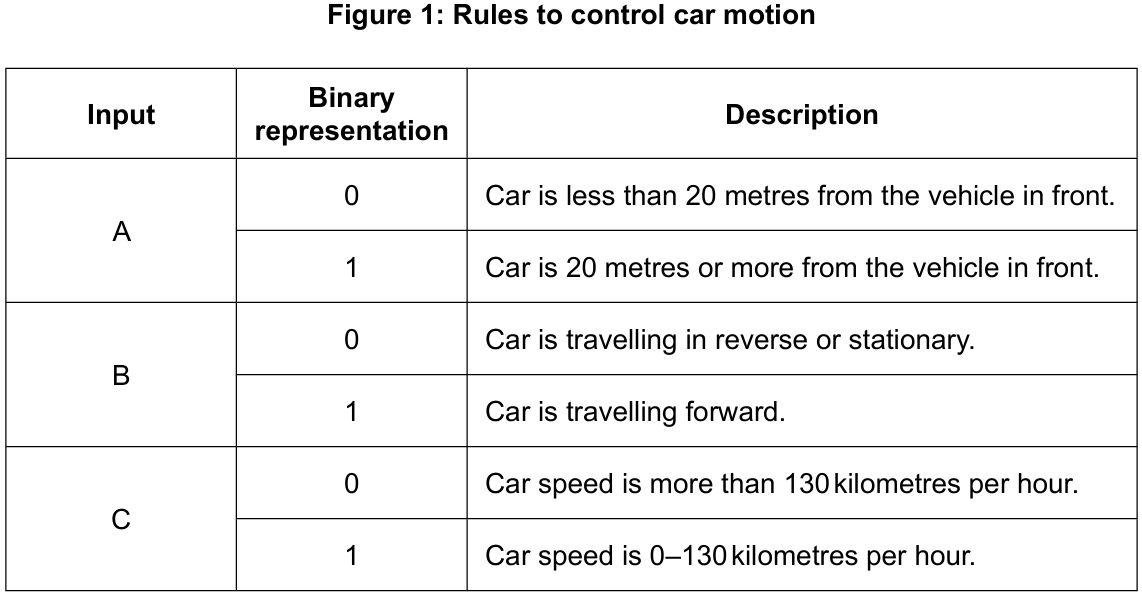
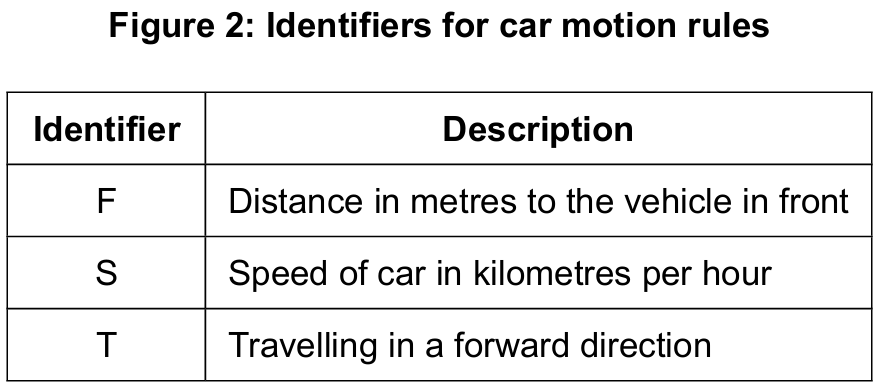
F = 5
S = 30
T = true

F >= 25 AND S >= 10 AND S <= 130 AND T = true
Most-appropriate topic codes (IB Computer Science SL):
• Topic $2.1$ — Computer organization (Parts $\mathrm{(a)}$ and $\mathrm{(b)}$)
• Topic $4.1$ — General principles (Parts $\mathrm{(c)}$, $\mathrm{(d)}$ and $\mathrm{(e)}$)
▶️ Answer/Explanation
(a)
For the correct answer (description OR truth table):
Outputs the value of one if and only if all inputs have a value of zero.
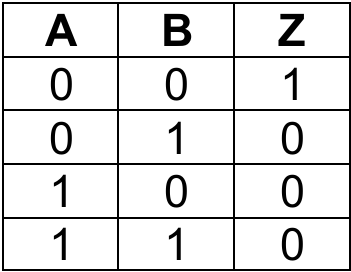
NOR is essentially a NOT applied to an OR gate — it only outputs 1 when every input is 0. The moment any input goes high, the output drops to 0. It is the complement of OR, just as NAND is the complement of AND.
(b)
For the correct answer:
The output Z should represent $Z = A’ \cdot B + C’$, meaning:
• Correct NOT gate with input A;
• Correct NOT gate with input C;
• Correct AND gate — one input from NOT(A) and one from B;
• Correct OR gate — inputs from AND gate output and NOT(C), output is Z.
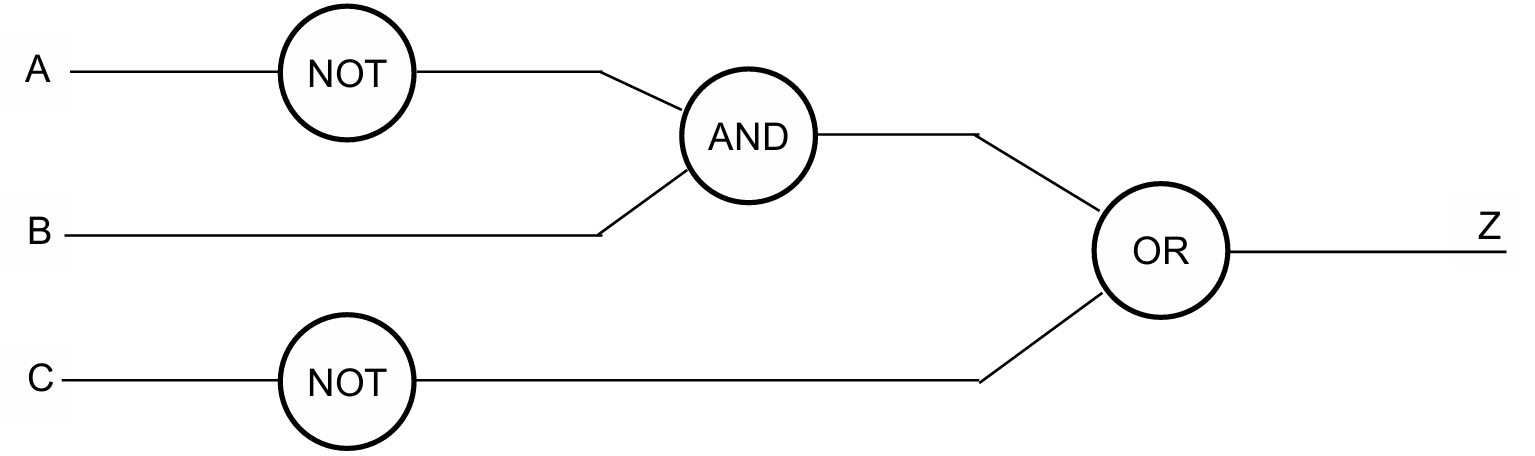
Reading the scenario: “travelling forward AND less than 20m” translates to $B=1$ AND $A=0$, i.e. $B \cdot \overline{A}$. “Speed more than 130 km/h” means $C=0$, i.e. $\overline{C}$. The two conditions are joined by OR, giving $Z = \overline{A} \cdot B + \overline{C}$. A NOT gate on A, AND with B, then OR with NOT(C) produces Z.
(c)
For the correct answer (rules for 0 and 1 can be reversed):

Input D follows the same convention as the existing inputs in Figure 1: binary 0 represents the dangerous/trigger condition (obstruction is close), and binary 1 represents the safe condition (no obstruction within 3 m). This matches the pattern used for input A, where 0 = car is too close to the vehicle in front.
(d)
For the correct answer:
5 >= 25 AND 30 >= 10 AND 30 <= 130 AND true
false AND true AND true AND true
Output = false
Substituting the given values: $F=5$ fails the first condition $F \geq 25$ ($5 \geq 25$ is false). Because AND requires all parts to be true, once the first sub-expression is false the entire compound expression is immediately false — no matter what the remaining values are. The overall result is false.
(e)
For the correct answer:
Use of flag (or otherwise) to maintain continuous loop; appropriate loop structure (while/repeat..until); inputs for distance and speed inside the loop; correct conditions to implement alarm notification; correct output of alarm; correct condition to cause loop to stop. Do NOT accept break to terminate the loop.
FLAG = true
loop while FLAG
    input D
    input S
    if D < 20 OR S > 130 then
        output "ALARM!!"
    end if
    if S = 0 then
        FLAG = false
    end if
end loop
The algorithm uses a boolean flag to keep the loop running while the car is moving. Inside the loop, it reads the distance and speed inputs, checks whether either threshold is breached, and outputs an alarm if so. The loop only exits when speed equals zero — meaning the car has stopped — which is the correct termination condition rather than a break.
Question 15
The matching colour and order indicator must have the same index in the COLOUR and ORDER arrays.
Most-appropriate topic codes (IB Computer Science):
• Topic $4.2$ — Connecting computational thinking and program design (Part $\mathrm{(a)}$, $\mathrm{(c)}$ and $\mathrm{(d)}$)
• Topic $4.1$ — General principles (Part $\mathrm{(b)}$)
▶️ Answer/Explanation
(a)
For the correct answer (any one method + correct description):
addItem() — adds an element to the collection (at the end)getNext() — returns / gets / obtains the next element from the collection (indicated by the pointer)resetNext() — restarts the iteration from the first element / moves the pointer back to the beginninghasNext() — returns TRUE if there is at least one more element in the collection that has not been accessed in the current iterationisEmpty() — returns TRUE if the collection contains no elements
Take hasNext() as a worked example of a collection method. A collection uses an internal pointer to track which element it is currently “at”. The hasNext() method peeks ahead from the current pointer position and returns TRUE if there is still at least one element that has not yet been retrieved in this pass through the collection, or FALSE if the pointer has reached the end. This is extremely useful as a loop condition — you simply keep calling getNext() as long as hasNext() returns TRUE, and the loop terminates naturally when all elements have been visited.
(b)
For the correct answer:
Correct use of collection methods hasNext(), getNext(), resetNext() or equivalent; initialising starting array index as $0$; appropriate loop for accessing RAINBOW elements; correct assignment to both arrays using same index with two adjacent elements from RAINBOW.
Example pseudocode:
RAINBOW.resetNext()
I = 0
loop while RAINBOW.hasNext()
    COLOUR[I] = RAINBOW.getNext()
    ORDER[I] = RAINBOW.getNext()
    I = I + 1
end loop
The RAINBOW collection alternates between a colour name and its order letter on every pair of elements. So the algorithm must call getNext() twice per loop iteration — once to get the colour (stored in COLOUR[I]) and immediately again to get the matching order letter (stored in ORDER[I] at the same index). Resetting the pointer at the start ensures we begin from the very first element. The index I starts at 0 and increments after each pair, so the corresponding colour and its order indicator always land at the same array index, preserving the parallel relationship between the two arrays.
(c)
For the correct answer (bubble sort or selection sort):
Nested loops with correct conditions; use of flag to stop the loop if no swaps made (bubble sort) or setting of MIN before inner loop (selection sort); comparing adjacent (bubble) or comparing to find smallest (selection) elements of ORDER array; swapping contents in ORDER array if required; corresponding swapping of contents in COLOUR array.
Bubble sort example:
SWAP = TRUE
loop while SWAP = TRUE
    SWAP = FALSE
    loop I from 0 to 5
        if ORDER[I] > ORDER[I + 1] then
            TEMP1 = ORDER[I]
            TEMP2 = COLOUR[I]
            ORDER[I] = ORDER[I + 1]
            COLOUR[I] = COLOUR[I + 1]
            ORDER[I + 1] = TEMP1
            COLOUR[I + 1] = TEMP2
            SWAP = TRUE
        end if
    end loop
end loop
Selection sort example:
loop I from 0 to 5
    MIN = I
    loop J from I + 1 to 6
        if ORDER[J] < ORDER[MIN] then
            MIN = J
        end if
    end loop
    if MIN <> I then
        TEMP1 = ORDER[MIN]
        TEMP2 = COLOUR[MIN]
        ORDER[MIN] = ORDER[I]
        COLOUR[MIN] = COLOUR[I]
        ORDER[I] = TEMP1
        COLOUR[I] = TEMP2
    end if
end loop
The critical detail in this question is that any swap applied to the ORDER array must also be applied to the COLOUR array at the same time. Because ORDER and COLOUR are parallel arrays (their meaningful relationship is that ORDER[I] always corresponds to COLOUR[I]), swapping only ORDER would break that relationship — Indigo might end up paired with the wrong order letter. So every time two ORDER elements are swapped, the COLOUR elements at those same indices must be swapped identically. This requires two temporary variables (TEMP1 for ORDER, TEMP2 for COLOUR) during every swap operation.
(d)
For the correct answer (at least one similarity AND one difference):
Similarities:
Both use nested loops, each time reducing the inner loop; both have the same worst-case time complexity $O(n^2)$; both perform in-place sorting directly within the array without requiring additional data structures or memory.
Differences:
Bubble sort works by comparing adjacent elements and swapping them if they are in the wrong order, repeating until the array is fully sorted; Selection sort works by finding the smallest (or largest) element from the unsorted portion and swapping it into position; Bubble sort can exit early / is faster if the list is already sorted (best case $O(n)$); Selection sort must complete the full procedure for the entire list every time (best case $O(n^2)$); Bubble sort has a higher number of comparisons and swaps for larger datasets, making it generally slower in practice.
Think of bubble sort as a very patient process that keeps walking through the list, nudging out-of-order neighbours past each other — like bubbles rising to the surface — until nothing needs to move any more. Selection sort is more strategic: on each pass it hunts through the entire remaining unsorted section to find the minimum element, then plants it at the front of the unsorted section in a single swap. Both are $O(n^2)$ in the worst case, but bubble sort has the nice property that if the list happens to already be sorted, it detects this in just one pass and exits (effectively $O(n)$ in the best case), whereas selection sort will methodically scan everything regardless.