
Question 1
Most-appropriate topic codes (IB Computer Science HL):
• Topic 2.1 — Computer organization
▶️ Answer/Explanation
Answer:
GUI components (such as tabs, buttons, scroll bars, icons, pointers, windows);
Toolbars;
Menus;
Dialogue boxes;
Simplicity / Intuitiveness / user friendly / intuitive and easy to use;
Consistency;
Clarity;
Attractiveness / Responsiveness / Familiarity / Accessibility / Efficiency / Customization.
A user interacts with software through its application interface; common visual elements like toolbars and menus provide structured access to commands, while dialogue boxes give feedback. Design qualities like intuitiveness and consistency ensure the user can navigate with ease, making the overall experience smoother and more efficient.
Question 2
Most-appropriate topic codes (IB Computer Science HL):
• Topic 2.1 — Computer organization
• Topic 6.1 — Resource management
▶️ Answer/Explanation
(a)
To store data permanently (even when the power supply is off), so it can be accessed at a later time; to provide large storage for files like videos, images, and databases; to back up important data for disaster recovery; or to transfer data between computers using removable devices.
Secondary memory retains information when the system is powered down, providing long-term, non-volatile storage. Unlike RAM, its content isn’t lost, making it essential for saving operating systems, software applications, and personal files that need to be preserved between work sessions.
(b)
When the primary memory (RAM) required by all running processes exceeds the actual physical RAM installed (a shortage of physical memory); for example, if a user attempts to edit a large video file that is much bigger in size than the available RAM, the operating system can use part of the secondary memory (like an SSD) as virtual memory.
The OS achieves this by storing inactive pages of a program on the hard drive temporarily via paging, freeing up physical RAM for active tasks. The inactive parts are swapped back into RAM from the secondary storage when they are needed again, effectively acting as an overflow extension.
Question 3
Most-appropriate topic codes (IB Computer Science HL):
• Topic 2.1 — Computer organization
• Topic 6.1 — Resource management
▶️ Answer/Explanation
Answer:
Upgrade the processor to one with a faster clock speed or more cores, which increases the speed of execution and makes the system more responsive;
Add more RAM, which allows faster access to data and enables the smooth running of memory-intensive applications like graphic design software.
Swapping an older hard disk drive for a faster and larger solid-state drive (SSD) also counts; the improved read/write speeds on an SSD drastically reduce boot times and how quickly applications load. Similarly, replacing a dated graphics card with a more powerful one allows the computer to render 3D environments better and improve the quality of images on the monitor.
Question 4
Most-appropriate topic codes (IB Computer Science HL):
• Topic 1.2 — System design basics
▶️ Answer/Explanation
Answer:
Observing users in their natural setting provides a deeper and more comprehensive understanding of how a process actually works, uncovering subtle insights that might be missed through interviews or surveys; it also captures real-time behaviour reliably, as responses are not influenced by a person’s memory or desire to give a socially acceptable answer.
By watching someone work, you spot workflow inefficiencies and workarounds that the user might consider normal and never think to mention. This method is cost-effective in the long run because the gathered data leads to clear outcomes, allowing developers to see exactly where the current system fails and what features are truly needed.
Question 5
Most-appropriate topic codes (IB Computer Science HL):
• Topic 2.1 — Computer organization
▶️ Answer/Explanation
Answer:
The truth table for the expression is as follows:
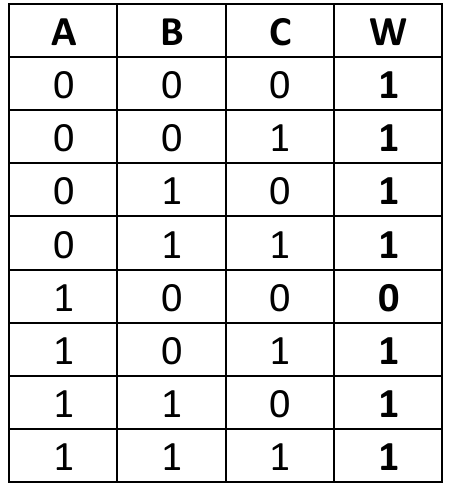
Working through the rows systematically, we evaluate sub-expressions like (not B and not A) first. For the row A=1, B=0, C=0, the term not B is 1 and not A is 0, making the AND operation 0. Then, C (0) OR that result (0) OR B (0) gives 0. All other combinations yield at least one true input into the final OR gates, making W true.
Question 6
Most-appropriate topic codes (IB Computer Science HL):
• Topic 1.1 — Systems in organizations
▶️ Answer/Explanation
Answer:
Parallel running;
Pilot running;
Direct changeover (Big-bang method);
Phased conversion.
Organizations can choose a smooth transition by using parallel running, where the old and new systems operate side-by-side for a period to ensure reliability. Another common approach is pilot running, introducing the system in a limited section of the business first to test its performance before a full-scale rollout, which helps contain potential risks.
Question 7
Most-appropriate topic codes (IB Computer Science HL):
• Topic 1.2 — System design basics
▶️ Answer/Explanation
Answer:
A DNS server contains a database of public IP addresses and their associated hostnames; it translates human-readable domain names (like www.example.com) into machine-readable IP addresses (like 192.0.2.1), allowing users to access websites using meaningful names instead of hard-to-remember numerical addresses.
Essentially, the DNS server acts as a phonebook for the internet. When you type a URL into your browser, the DNS server finds the matching IP address and directs your traffic to the correct web server, ensuring you reach the right destination without having to memorize complex strings of numbers.
Question 8
Most-appropriate topic codes (IB Computer Science HL):
• Topic 3.1 — Networks
▶️ Answer/Explanation
Answer:
An employee working from a remote location, such as a coffee shop, can use a VPN to securely access their company’s internal network and resources. The VPN creates an encrypted tunnel for the data, which prevents hackers on the public Wi-Fi from intercepting sensitive login credentials or confidential company documents.
Without a VPN, an employee’s connection to company databases would travel over the public network in plain sight. The encryption feature of the VPN scrambles the data so that even if a cybercriminal captures the packets, they are unreadable. This ensures privacy and security for business operations outside the office.
Question 9
Most-appropriate topic codes (IB Computer Science HL):
• Topic 1.2 — System design basics
• Topic 3.1 — Networks
• Topic 1.1 — Systems in organizations
▶️ Answer/Explanation
(a)(i)
For the correct answer:
Software used (by designers) to create 2D/3D models of physical components / software used to simulate hand drawn sketches of component parts of an entity (machine, vehicle, etc.); software that is used to create / modify / analyse / enhance a design.
CAD software essentially acts as a digital drafting table for the architect. It replaces the physical pen and paper, allowing her to precisely create, manipulate, and refine detailed architectural plans digitally. It brings the design to life by creating realistic models that can be viewed from any angle, something impossible to achieve with just hand-drawn sketches.
(a)(ii)
For the correct answer (any two with expansion):
Increased productivity: CAD software automates most of the architect’s repetitive tasks, enabling quicker project completion so the same amount of time can result in a greater number of completed projects.
Better quality of drawings / realistic designs / better visualization of the product: The CAD makes use of best tools that allow creation of precise complex drawings of surfaces and shapes, giving clients a much clearer idea of the final construction.
Flexibility to modify designs: Unlike a paper sketch, the architect can instantly change a window size or wall layout across the whole project file without starting over. Additionally, it improves collaboration, as the CAD file can be easily saved and sent to clients or structural engineers for real-time feedback, and it saves cost because a model could be tested virtually before any physical structure is produced.
(b)
For the correct answer:
To reduce the size of files; so that less memory space on the architect’s computer is occupied / more CAD files can be stored in the available memory; faster upload/download / transmission time reduced / improved data transfer speed; easier to meet attachment size restrictions / reductions in communication bandwidth (capacity for the data transfer): meaning a significant decrease in expenses.
Sending a raw, uncompressed CAD rendering could take hours and clog up network bandwidth. By using compression, the architect shrinks the file to a manageable size, which saves time and avoids the frustration of bounced emails due to oversized attachments. Essentially, compression allows the data to travel quickly and fit neatly, without completely sacrificing the image quality needed for the client review.
(c)(i)
For the correct answer:
A regular/periodical back up; stored on external storage devices; data could be quickly recovered.
A secondary system / a standby computer (or only duplicate disks and a processor); with an appropriate backup system; that might take over, with data quickly restored to the last point it was backed up.
Cloud Storage / the architect can save/back up all files to the cloud (Accept examples, OneDrive, Google Drive, etc.); and can access them from any device/anywhere; anytime/when required/when disk fails.
The goal is to ensure the business doesn’t grind to a halt. By keeping a recent clone of the drive or using a cloud service that syncs continuously, the moment the main disk crashes, she can switch to a laptop and pull down the critical project files. This turns a potential disaster into a minor inconvenience, keeping the downtime to an absolute minimum.
(c)(ii)
For the correct answer (any two with expansion):
Human errors: Data may be accidentally deleted / entered / altered inaccurately / files may be wrongly replaced / files might not be saved. For example, the architect might mistakenly overwrite a final blueprint with an old draft.
Computer viruses / malicious acts / malware / hacking: Can steal / alter / destroy data. A ransomware attack could encrypt all her project files, making them unreadable without a key.
Natural disasters (for example, floods, earthquakes, hurricanes, cyclones, fires, lightning): that can damage on-premises software/hardware and lead to data loss. A fire in her home office could destroy the computer entirely. Software malfunction is another risk; an application used for requesting/editing data can crash resulting in the loss of any unsaved work.
Question 10
Most-appropriate topic codes (IB Computer Science HL):
• Topic 1.2 — System design basics
• Topic 3.1 — Networks
• Topic 1.1 — Systems in organizations
▶️ Answer/Explanation
(a)
For the correct answer:
Each user should be assigned a user role (administrator, student, teacher, guest); Each user must have a unique username and password; Different access levels could be implemented by using password/ authentication (PIN/ token/ biometrics/ two-factor authentication (2FA) before accessing a file/ through whitelisting/blacklisting devices/ by verifying MAC addresses).
Users assigned an administrator role have full access to the system/ are allowed to perform most operations on the system (such as, add, remove, edit users, groups, domains, manage passwords, configure services, etc.); Users assigned a teacher role have read-write access to update student grades/ read-only access to students’ records/ no access to other teachers’ financial records; A user assigned a student role has read access to their reports / no access to other students’ /teachers’ data; A user assigned a guest role has restricted/limited access to certain file/folders/information / no access to the files with sensitive or personal data/ users with guest accounts can only read from files containing general information/ guest users cannot perform any actions/ guest users can only browse the internet).
Essentially, the school creates a virtual boundary around the sensitive data. The combination of a unique login (authentication) and pre-defined roles (authorization) ensures that when a student logs in, the system’s rules automatically block them from clicking on the staff’s financial records. Creating a VLAN can segment the network physically, keeping guest traffic completely separate from the internal secure server traffic.
(b)(i)
For the correct answer:
Fibre-optic cable; Because data transmission is fast/ reliable.
Coaxial cable (Cable internet); Because it is (still) one of the fastest internet types / is significantly faster than DSL/ practical because it uses the same coaxial connections as phone services/ cable TV.
Fibre-optic is the gold standard for a modern school. It uses pulses of light to transmit data, which gives it much higher bandwidth and is less susceptible to interference over long distances compared to traditional copper wires. This ensures hundreds of students in different classrooms can stream video or take online tests simultaneously without the network grinding to a halt.
(b)(ii)
For the correct answer (any two with justification):
Enable firewalls; To monitor/prevent unauthorized access to the network/ to alert network administrators to any intrusion attempts/ to monitor all the incoming and outgoing traffic of the school network/ to set the rules to blacklist certain websites.
Install an antivirus program on all computers; run or schedule regular virus scans to keep computers virus-free. If a teacher accidentally downloads a malicious file, the antivirus acts as the second line of defense, quarantining it before it spreads.
Use encryption; if cybercriminals gain access to the network, encryption prevents them from reading/understanding any of sensitive information. Train/educate users (teachers, students); to use complex passwords/ to update passwords on regular basis/to ignore email messages from unknown parties and never click on links or open attachments. The human element is often the weakest link, so teaching staff not to fall for phishing scams is a critical security measure.
(c)
For the correct answer (any three):
Emails may fill the storage available; emails may overload the internet connection/ emails with larger file transfer can utilize a lot of network bandwidth; phishing attacks/ potential data leak- students click link in emails/visit an infected website; downloading of viruses or worms from emails corrupting the whole network; if email accounts are compromised, attackers could gain access to school systems/ distribute malware across the network; inappropriate messages may be sent within/ outside the school/students may use it for bullying; e-mail messages could be used to cheat on exams/ assignments; teachers/ students may become vulnerable to email from strangers/ a risk of sending/receiving offensive/ inappropriate/ harmful content through email; inappropriate use of school email for personal communication; many email accounts can increase the workload for IT staff/ more IT support/ monitoring/ maintenance needed; increased costs (for licensing, email server, etc.).
Giving everyone an email account opens the door to serious security risks; a single student clicking a fake ‘password reset’ link can trigger a ransomware attack that locks the entire school network. Beyond security, it impacts resources, as a class of students simultaneously sending large video projects via email can saturate the bandwidth, making basic web browsing impossible. There is also a human cost, as email systems can be misused for cyberbullying or cheating, creating a toxic environment that the administration then has to police.
Question 11
Most-appropriate topic codes (IB Computer Science HL):
• Topic 7.1 — Control
• Topic 6.1 — Resource management
▶️ Answer/Explanation
(a)(i)
For the correct answer:
An embedded system is a microprocessor/ controller-based system within a larger system or device; which is designed to perform a specific task / can be programmable/ have a fixed functionality.
Unlike a desktop PC that can run thousands of different apps, an embedded system in a traffic light only runs one specific control program. It is the hidden brain inside the device, dedicated to reading sensor inputs and managing the light timing outputs in real time, often operating with extreme reliability for years without user interference.
(a)(ii)
For the correct answer (any two):
Industrial machines; Household appliances; Automobiles/airplanes; Medical equipment; Digital watches; Cell phones; Toys.
Examples are everywhere; the digital watch on your wrist runs a small embedded system to track time crystals and update the display. Even your microwave uses one to manage the keypad input and precisely time the radiation based on the setting you select, demonstrating dedicated, single-task functionality.
(b)
For the correct answer (max [2] for pros, max [2] for cons):
Pros: Better control over traffic flow/ any problem appearing at one traffic light is known immediately/ can be dealt with immediately; Traffic lights can be quickly adapted to avoid traffic blocks/ when levels of traffic flow change; All traffic lights can be synchronized efficiently, allowing smooth traffic flow across the city (e.g., creating green waves on main roads); Easier to add additional hardware/ inputs such as sensors; Cheaper- reduces the need for separate hardware (controllers or advanced systems) at each intersection/ cheaper maintenance; Centralised data collection (accidents, traffic) that could help with future planning; Control program can be done at one place, with different programs for different times of day and related traffic patterns; easier maintenance/software updates can be performed centrally without having to make adjustments at every intersection.
Cons: Single point of failure – failure of the central computer stops the entire city’s traffic system; system depends on high-speed communication links, network failure can disrupt activity; the capacity/speed of the central computer can be limited/cannot provide the desired levels of service (many inputs with differing priorities which could take time); high initial cost of communication system/central control system/software; security risks/cyberattacks on the central computer affects the entire city; reduced local autonomy/ individual intersections cannot make local decisions like dealing with an unexpected blockage/ emergency; difficult to scale up as the city expands (system may struggle to handle increased load) / disruption in service/ increased complexity in decision-making and processing.
The centralization offers a tempting bird’s-eye view of the city. With it, you can dynamically orchestrate ‘green waves’ for ambulances or rush-hour traffic patterns. However, putting all the city’s eggs in one basket is incredibly risky; a single software crash or a successful denial-of-service hacking attack wouldn’t just break one light, it would plunge the entire city into a dangerous and chaotic gridlock.
(c)
For the correct answer (any two):
Motion sensors; Pneumatic tubes; Piezoelectric sensor; Inductive loop; Magnetic sensors; Acoustic detectors; Infrared detectors/sensors; Doppler sensors; Radar/microwave/ultrasonic sensors; Pressure sensors; Image sensors; Radio frequency sensors; Proximity sensors.
A common method is an inductive loop embedded in the road surface; when the metal body of a car passes over it, it changes the magnetic field which the sensor detects, providing a very accurate count. Overhead infrared or radar sensors can also count vehicles by beaming waves down and measuring the reflection patterns of moving objects without cutting into the road surface.
(d)
For the correct answer:
Interrupt can occur at any point in time (an interrupt is asynchronous); processor polls the devices at regular intervals of time (polling is a synchronous activity).
Interrupt occurs only when a device requires servicing; Polling occurs when processor needs to wait and check if a device needs to be serviced/ processor continuously checks the status of the device to find whether it requires attention.
Interrupts save the processor cycles; polling wastes many of the processor cycles. Interrupts are priority based; Polling involves sequential checking with no priority.
This means the CPU doesn’t waste time with interrupts; it just works on other tasks until the traffic sensor literally “taps it on the shoulder” with an interrupt signal. With polling, the CPU expends cycles constantly asking the sensor, “Do you have a car to count yet?”, which is less efficient for low-frequency events like a quiet suburban street at 3 AM.
(e)
For the correct answer:
Enables the optimization of traffic flow; saving time/ fuel/cost; which is of great benefit for taxi drivers, logistics providers, on-demand services such as food delivery.
Early warnings about traffic incidents; improve driver safety/ save lives; a quick passage to emergency vehicles (ambulances / fire tenders) can be facilitated.
Providing traffic advisories/ alternative route diversion; improve drivers’ comfort; which means less stress/ less traffic accidents.
Insights into traffic accidents/congestion/delays across the city road network; allows drivers to delay or prepone the trip based on current traffic trends; plan the departure time more effectively.
This technology fundamentally changes a driver’s relationship with the road. Instead of blindly driving into a ten-mile tailback, real-time data feeds into the car or phone, instantly recalculating a clear route. This isn’t just about convenience; knowing that a route is blocked due to flooding or a major accident ahead gives drivers the crucial minutes they need to slow down safely, potentially preventing secondary pile-ups and saving lives.
Question 12
refn(N)
    if N < 1 then
        return 1
    else if N mod 2 = 0 then
        return refn(N-1) - N
    else
        return refn(N-1) + N
    endif
endif
end refn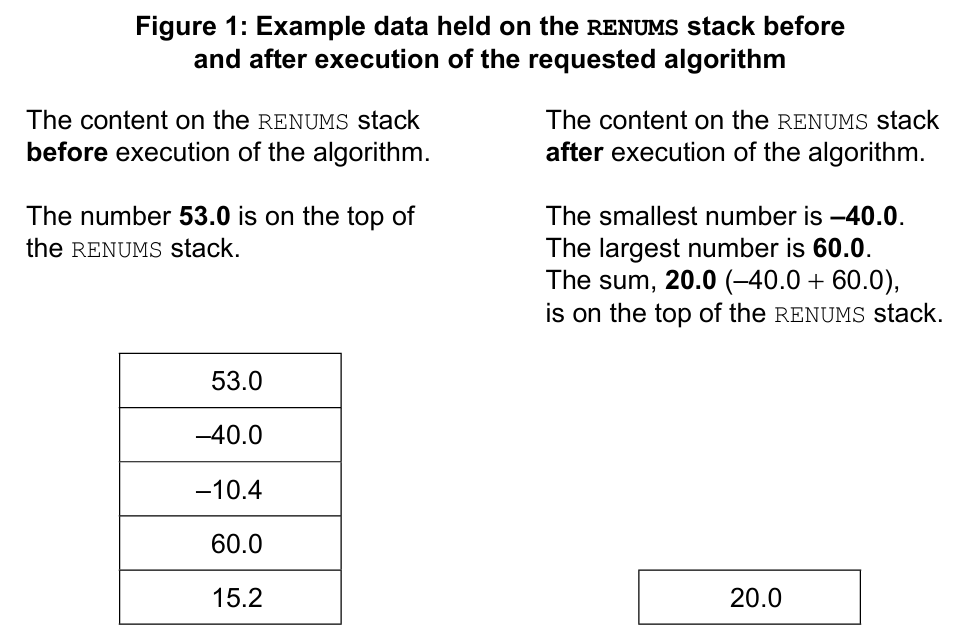
Most-appropriate topic codes (IB Computer Science HL):
• Topic 5.1 — Abstract data structures
▶️ Answer/Explanation
(a)
For the correct answer and working:
\[\begin{align*} X = \text{refn}(5) & = \text{refn}(4) + 5 \quad \text{(5 is odd, not < 1)} \\ & = (\text{refn}(3) – 4) + 5 = \text{refn}(3) + 1 \quad \text{(4 is even)} \\ & = (\text{refn}(2) + 3) + 1 = \text{refn}(2) + 4 \quad \text{(3 is odd)} \\ & = (\text{refn}(1) – 2) + 4 = \text{refn}(1) + 2 \quad \text{(2 is even)} \\ & = (\text{refn}(0) + 1) + 2 = \text{refn}(0) + 3 \quad \text{(1 is odd)} \\ & = 1 + 3 = 4 \quad \text{(0 < 1, base case returns 1)} \end{align*}\]
The final value of X is 4.
We trace the function step-by-step. Starting with refn(5): since 5 is not less than 1 and is odd, the call becomes refn(4) + 5. Next, refn(4) is called; 4 is even, so it returns refn(3) – 4. Substituting this back gives us refn(3) + 1. Now refn(3) is called; 3 is odd, so it becomes refn(2) + 3, making the expression refn(2) + 4. Continuing, refn(2) is even, giving refn(1) – 2 and the expression refn(1) + 2. Then refn(1) is odd, returning refn(0) + 1, so we have refn(0) + 3. Finally, we hit the base case: refn(0) returns 1 because N is less than 1. Substituting 1 back up the chain of recursive calls, we get 1 + 3 = 4. The entire chain unwinds to yield this final answer, with each pending operation being resolved as the stack frames pop.
(b)
For the correct answer (any two, with description):
Push; Add an element to the top of a stack.
Pop; Remove an element from the top of a stack.
IsEmpty; Check if the stack contains no elements/ returns True when a stack is empty, returns False otherwise.
IsFull; Check if the stack has reached maximum capacity/ returns True when a stack is full, returns False otherwise.
These operations strictly follow the Last-In, First-Out (LIFO) principle. Think of a stack like a pile of cafeteria trays. You can only add a clean tray to the top of the spring-loaded pile (push), and you can only take the very top tray to use it (pop). You cannot pull a tray from the middle without dismantling the whole structure, which is exactly how a stack data structure enforces order on its elements.
(c)
For the correct answer (example algorithm):
// Initialization: pop the top element to set initial values
X = RENUMS.pop()
SMALLEST = X
LARGEST = X

// Loop through all remaining elements on the stack
loop while not RENUMS.isEmpty()
    X = RENUMS.pop()
    if X <= SMALLEST then
        SMALLEST = X
    end if
    if X >= LARGEST then
        LARGEST = X
    end if
end loop

// After the stack is empty, push the sum back onto the stack
SUM = LARGEST + SMALLEST
RENUMS.push(SUM)
The algorithm begins by safely popping the top element to initialize both the SMALLEST and LARGEST variables with a real starting value from the data. This is crucial because we need a baseline to compare against. It then enters a loop, continuously popping the remaining elements one by one until the stack is completely exhausted. As each number comes off the top of the stack, it’s compared to the current records; if it’s smaller than the current SMALLEST, it replaces it, and if it’s larger than the current LARGEST, it replaces that too. Once every number has been inspected and the stack is empty, we take the sum of these two found extreme numbers and push that single resulting sum back onto the now-empty RENUMS stack as the final step, matching the required output exactly.
Question 13
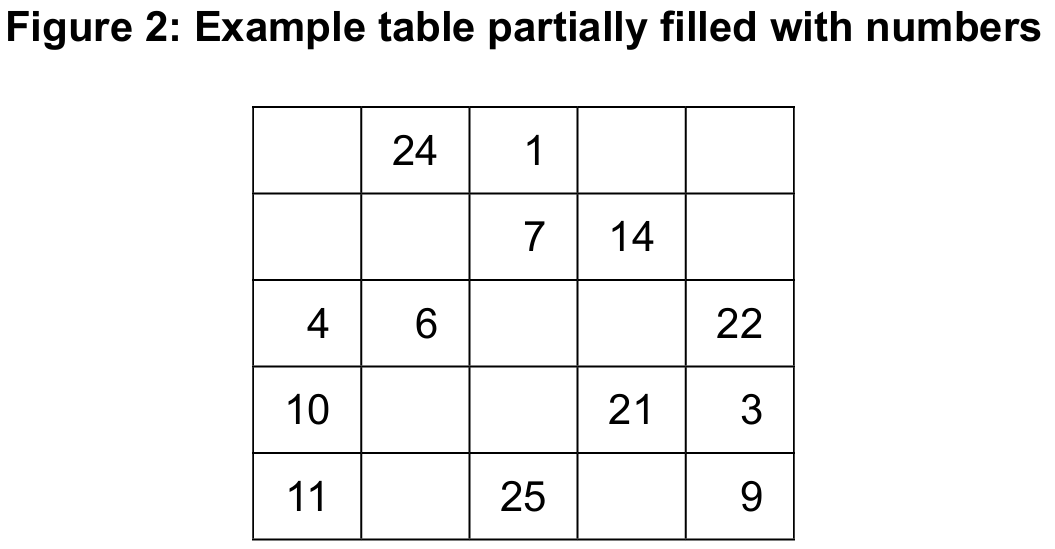
inputCheck() should return a valid input number. This will ensure that the younger student’s input is a number in the range 1–25 inclusive. If the input number is not in this range, an appropriate message is output. The process will be repeated until a valid number is input.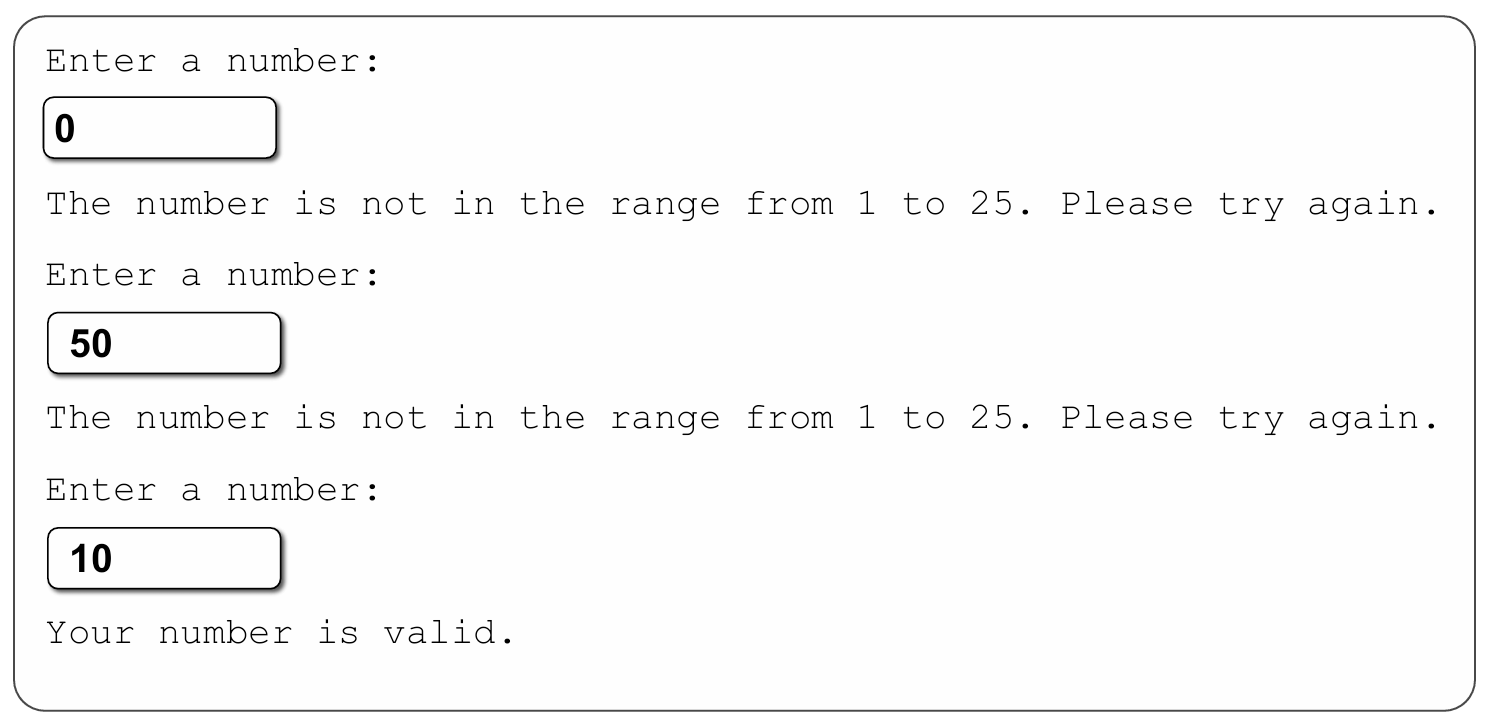
inputCheck(). 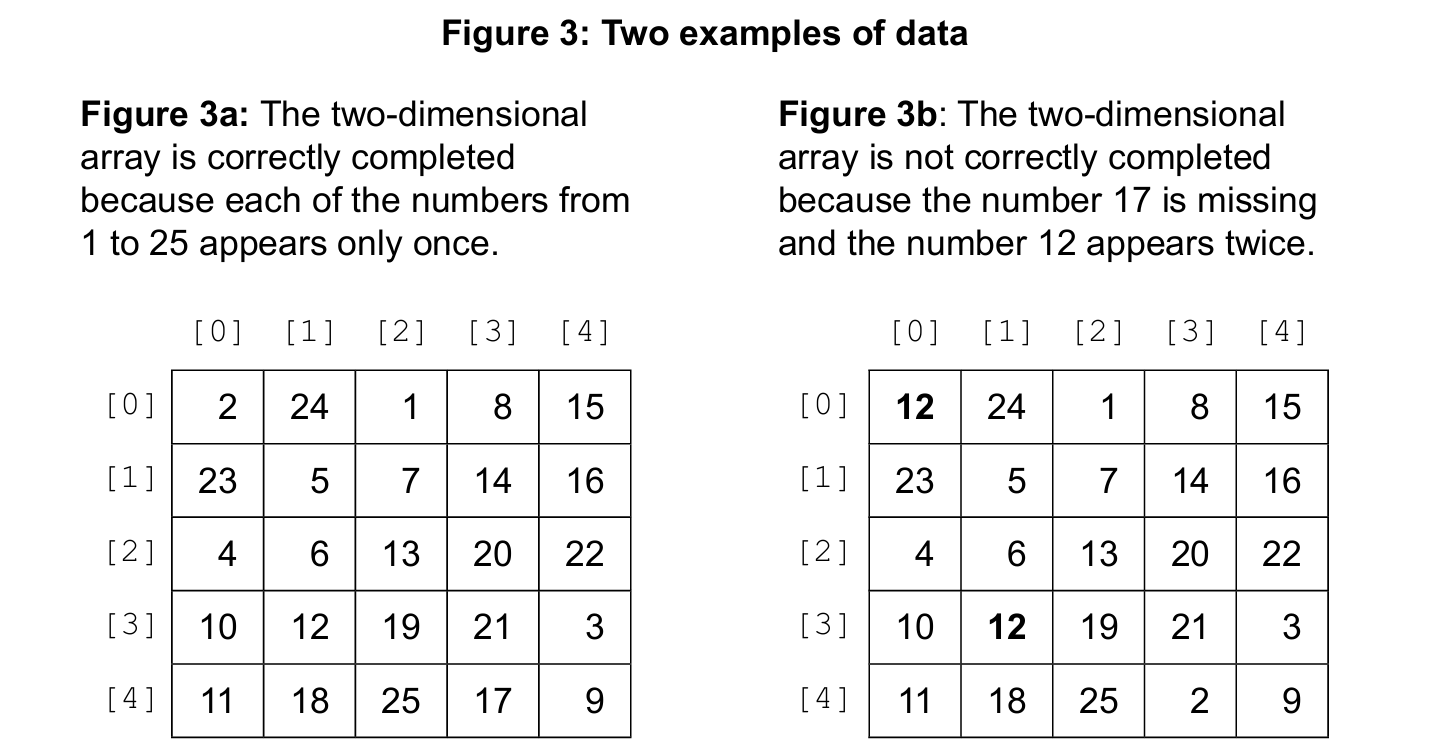
isCorrectlyCompleted(MAT) accepts the two-dimensional array MAT and outputs an appropriate message to indicate if it has been correctly filled.isCorrectlyCompleted(MAT) sub-program is as follows:- Initialize a one-dimensional array, FLAGS, with zero (0) values.
- Visit all elements of the MAT array.
Use the number stored in the MAT array to match up the index in the FLAGS array.
Assign one (1) to the FLAGS array at that index. - Inspect elements of the FLAGS array.
If all the elements in the FLAGS array are one (1), output a message saying that the table has been completed correctly; otherwise, output a message saying that the table has not been completed correctly.


isCorrectlyCompleted(MAT) sub-program as described. [8]Most-appropriate topic codes (IB Computer Science HL):
• Topic 4.1 — General principles
• Topic 4.3 — Introduction to programming
• Topic 5.1 — Abstract data structures
▶️ Answer/Explanation
(a)
For the correct answer (any three):
The (difficult) program is divided into several easier parts (sub-programs); The program is better organized/ easier to understand /reduced size of code (due to several sub-programs calls)/ no duplication of code; Sub-programs hide implementation details; Sub-programs keep specific tasks self-contained; Each of the sub-programs could be written independently; Each of the sub-programs is debugged/tested independently; Different parts of the program can be written at the same time/ concurrently; Sub-programs speed up the development process (as different students can work on different subprogram at the same time); Each sub-program could be used many times in this program (and in other programs); The maintenance/modification/change of the program will be easier/faster (because only a sub-program could be changed/modified as needed).
This modular approach is perfect for a team of four. While one person fixes a bug in the ‘inputCheck’ function, another can finish the logic for ‘isCorrectlyCompleted’ without stepping on each other’s toes. It also avoids code duplication—if they need to validate numbers in multiple places, they just call the sub-program again instead of copying and pasting the logic, making the final code much cleaner and easier to read.
(b)
For the correct answer (Example 1):
inputCheck()
    K = input('Enter a number:')
    loop while (K < 1) or (K > 25)
        output('The number is not in the range 1 to 25.')
        output('Please try again!')
        K = input('Enter a number:')
    end loop
    output('Your number is valid.')
    return K
end inputCheck()
The algorithm sets up a conditional loop that acts as a strict but polite gatekeeper. It takes the first guess from the young student, and if that number is outside the 1 to 25 boundaries, it provides a clear error message asking them to try again. The loop keeps running, repeatedly asking for a number until the user finally enters a valid one. At that point, it gives a positive confirmation and returns that good number back to the main program, ensuring no invalid data ever corrupts the table.
(c)
For the correct answer (Example 1):
isCorrectlyCompleted(MAT)
    // the FLAGS array holds 25 zeros indexed from 0 to 24
    // initializing the FLAGS array
    loop K from 0 to 24
        FLAGS[K] = 0
    end loop

    // matching up the values in the MAT array with
    // indexes in the FLAGS array
    // and assigning values to elements of the FLAGS array
    loop R from 0 to 4
        loop C from 0 to 4
            INDEX = MAT[R][C] - 1
            FLAGS[INDEX] = 1
        end loop
    end loop

    // inspecting all elements in the FLAGS array
    // and displaying appropriate messages
    F = true
    loop K from 0 to 24
        if FLAGS[K] = 0 then
            F = false
        end if
    end loop

    if F then
        output('the table has been correctly completed')
    else
        output('the table has not been correctly completed')
    end if
end isCorrectlyCompleted
We start by resetting every cell in a 25-slot FLAGS array to zero, creating a clean checklist. As we traverse every row and column of the student’s grid, we take the number they placed in the cell, subtract one to get a zero-based index, and set the corresponding flag slot to one. For example, a value of 7 turns FLAGS[6] on like a light switch. After scanning the whole grid, we walk through the FLAGS array with a fine-toothed comb; if we find even a single slot still holding a zero, it means that specific number (index + 1) was never placed in the table, and we immediately flag the completion as incorrect. If we finish the check and the flag remains true, it confirms that every number from 1 to 25 appeared exactly once.