
Question 1
Most-appropriate topic codes (IB Computer Science SL):
• Topic 1.2 — System design
• Topic 2.1 — Computer organization
▶️ Answer/Explanation
Answer:
GUI components (tabs, buttons, scroll bars, icons, pointers, windows);
Toolbars;
Menus;
Dialogue boxes;
Detailed Solution:
The question asks you to simply recall two common parts of a program’s interface that users interact with. Think about the software you use daily; a web browser has a toolbar with back and forward buttons, which is one correct feature. Another very obvious feature is the menu bar, usually found at the top with options like “File,” “Edit,” or “Help.” A dialogue box, which is a small window that pops up to give you information or ask for confirmation, is also a standard part of an application interface. The markscheme gives a list of these GUI elements, and picking any two like “menus” and “toolbars” will secure the marks.
Question 2
Most-appropriate topic codes (IB Computer Science SL):
• Topic 3.1 — Network
▶️ Answer/Explanation
Answer:
Employees may use a VPN to access a company’s network/internal resources/databases from a remote location: VPN creates a tunnel; allowing secure connections and access (based on employees’ roles);
Users who need a secure/private communication may use VPN; VPN encrypts data; and prevents hackers from intercepting sensitive information.;
Detailed Solution:
To explain this, you need to give a reason, a feature of a VPN, and then connect them. A very common and clear scenario is about security on public Wi-Fi. You might say that a user connects to an insecure public Wi-Fi network at a coffee shop, and a VPN is used to protect their data. The VPN’s feature of encryption takes the plain data and scrambles it into an unreadable code. This elaboration connects the reason and the feature by showing that if a hacker intercepts the data, the encryption from the VPN prevents them from understanding anything, thus keeping the user’s passwords and personal details safe.
Question 3
Most-appropriate topic codes (IB Computer Science SL):
• Topic 1.1 — Systems in organization
▶️ Answer/Explanation
Answer:
Direct observation allows for studying a process in its natural setting; this provides a deeper/ more comprehensive understanding of the process;
Observing enables a full assessment of the process/ how users interact with their surroundings; uncovering insights that might be missed through other means;
Detailed Solution:
The question asks for two advantages, and each needs a description. The first advantage you could describe is the depth of understanding gained. When you observe users in their natural work environment, you see the real-life context of their actions, giving you a much richer understanding than just reading a questionnaire answer. A second strong advantage is the reliability of the data collected. Unlike an interview where a user might forget a step or describe what they think they should do, direct observation captures their actual behaviour and real-time interactions with the system, which is incredibly valuable for identifying the true requirements for an update.
Question 4
Most-appropriate topic codes (IB Computer Science SL):
• Topic 2.1 — Computer organization
▶️ Answer/Explanation
Answer:
The diagram should consist of three inputs A, B, and C. Input B is connected to a NOT gate to produce NOT B. Input C is connected to a NOT gate to produce NOT C. The output of both NOT gates (NOT B and NOT C) are connected to the inputs of an AND gate. Finally, input A and the output of the AND gate are connected to the inputs of an OR gate, whose output is X.
Detailed Solution:
Start by breaking down the expression from the inside out, using the precedence rule that NOT is evaluated before AND, which is evaluated before OR. First, you need a NOT gate for input B to get “NOT B,” and another NOT gate for input C to get “NOT C.” Then, the results of these two NOT operations must be combined with an AND gate to perform the “NOT B AND NOT C” part of the expression. The final step is to combine the original input A with the result of the AND operation. This is done with an OR gate, which takes A and the output from the AND gate as its two inputs to produce the final output X.
Question 5
K=1
S=0
Z=0
loop while K<6
    A=Kmod3
    if A=2 then
        S=S+K
    else
        if A=1 then
            S=S-K
        else
            S=S+1
        end if
    end if
    Z=Z+S
    K=K+1
end loop
output ('The result: ', Z)
Most-appropriate topic codes (IB Computer Science SL):
• Topic 4.2 — Connecting computational thinking and program design
▶️ Answer/Explanation
Answer:
The trace table should have columns for K, S, Z, A, and the Output.
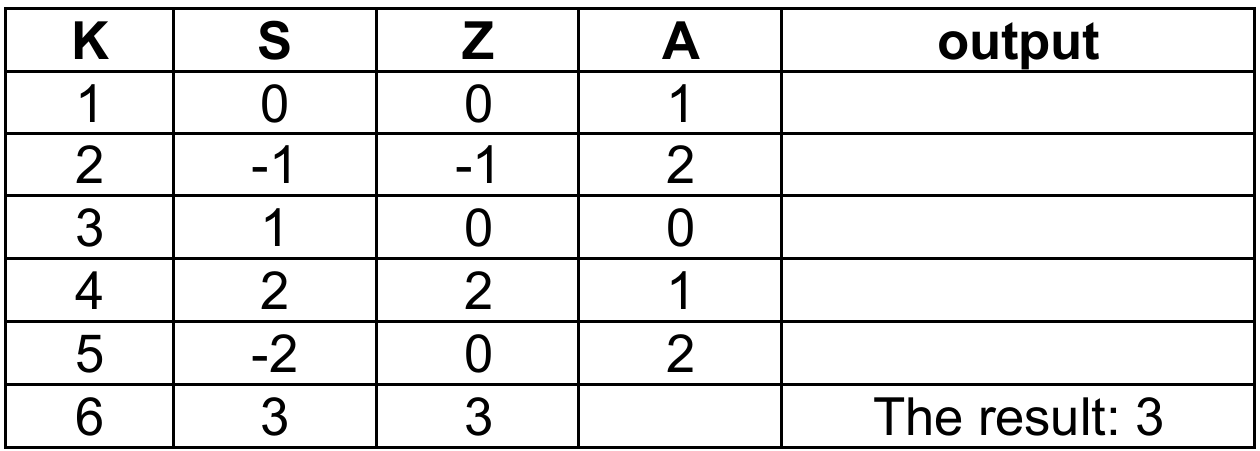
Detailed Solution:
We trace the values row by row, starting with the given initializations K=1, S=0, Z=0. For the first iteration, K=1, so A = 1 mod 3 = 1. The condition A=2 is false, so we check A=1, which is true, making S = 0 – 1 = -1. Then Z becomes 0 + (-1) = -1, and K increments to 2. We continue this process, meticulously updating S based on the modulus check, then adding S to Z for each row. The loop stops when K becomes 6. By the final row, after K=5, we see the final value of Z is 3, which matches the output statement “The result: 3”.
Question 6
Most-appropriate topic codes (IB Computer Science SL):
• Topic 1.1 — Systems in organization
▶️ Answer/Explanation
Answer:
Parallel running;
Pilot running;
Direct changeover;
Phased conversion;
Detailed Solution:
This question requires you to simply name two different strategies for rolling out a new system. “Direct changeover” is an easy one to remember, where you simply turn off the old system and turn on the new one instantly. A much safer method, which is a second correct answer, is “parallel running,” where the old and new systems operate side-by-side for a period. This allows users to verify the new system works correctly before the old one is retired, which helps prevent catastrophic data loss if the new system has hidden flaws.
Question 7
Most-appropriate topic codes (IB Computer Science SL):
• Topic 3.1 — Netwroks
• Topic 1.2 — System design
▶️ Answer/Explanation
Answer:
Contains a database of public IP addresses and their associated hostnames/domain names; translates/matches those website hostnames to their corresponding IP addresses;
Detailed Solution:
The DNS server acts like a phone book for the internet, but instead of names and phone numbers, it matches website names with their IP addresses. You can think of it like asking a directory service to find a person’s phone number; your computer gives the DNS server a human-friendly address like `www.ibschool.com`, and the server looks in its records to find the corresponding machine-friendly IP address, like `2001:0db8:85a3:1111::8a2e:0380`. It then returns this IP address so your web browser can connect to the right server and load the page, which is essential because people remember names far better than long strings of numbers.
Question 8

Most-appropriate topic codes (IB Computer Science SL):
• Topic 2.1 — Computer organization
▶️ Answer/Explanation
(a) Answer:
1B2
Detailed Solution:
To convert a binary number to hexadecimal, you split the 12-bit binary string into groups of four bits starting from the right. So, `000110110010` becomes `0001`, `1011`, and `0010`. Now, you convert each 4-bit group to its hex equivalent: the nibble `0001` is the value 1, the nibble `1011` corresponds to the value 11, which is the letter ‘B’ in hexadecimal, and the nibble `0010` is the value 2. Putting these hex digits together from left to right gives you the final answer of 1B2.
(b) Answer:
\(2^{12} / 4096\)
Detailed Solution:
This is a pure application of combinatorics on binary digits. A single bit can hold 2 distinct values (0 or 1). If you have 12 of them in a register, the total number of unique combinations you can make is \(2^{12}\). This is because each of the 12 positions is an independent choice, so it’s 2 multiplied by itself 12 times. Calculating this value gives you 4096, which represents every pattern from twelve zeros (0) to twelve ones (4095).
Question 9
Most-appropriate topic codes (IB Computer Science SL):
• Topic 2.1 — Computer organization
• Topic 3.1 — Networks
• Topic 1.1 — Systems in organization
▶️ Answer/Explanation
(a)(i) Answer:
Software used (by designers) to create 2D/3D models of physical components / software used to simulate hand drawn sketches or component parts of an entity (machine, vehicle, etc.); software that is used to create / modify / analyse / enhance a design;
Detailed Solution:
CAD software is essentially a specialized digital toolkit for an architect. Instead of manual drafting tools like a pencil and a T-square, the architect uses a computer program to create highly precise and detailed digital drawings and models of buildings or components. It’s not just about drawing lines; it’s about creating a digital representation of a physical object which can be a simple 2D floor plan or a full 3D model that can be viewed from any angle.
(a)(ii) Answer:
Increased productivity; CAD software automates most of the architect’s tasks which allows quicker project completion/ the same amount of time can result in a greater number of completed projects;
Flexibility to modify designs; Allows for changes and revisions to be visualized and approved;
Detailed Solution:
One major benefit is the sheer speed and productivity it offers. The software can automate many repetitive tasks, meaning a design that once took a week to draft by hand can be completed in a day, boosting the architect’s overall output. A second benefit is the incredible flexibility it provides for making changes; if a client wants to see what their house looks like with a different window style, the architect can modify the digital model instantly. This is a massive advantage over hand-drawn sketches, where a significant change might mean starting the entire drawing over again.
(b) Answer:
To reduce the size of files; so that less memory space on the architect’s computer is occupied/ more CAD files can be stored in the available memory; faster upload/download/ transmission time reduced/ improved data transfer speed;
Detailed Solution:
CAD files with large graphics are huge, which creates two main problems: storage and transfer. The “need” is explained by first stating that compression is done to reduce the file size. This means the architect can fit more projects onto her computer’s hard drive without running out of space. The second part is about data transfer; a smaller file takes significantly less time to upload and send over the internet to a client or contractor, improving efficiency. This also helps to avoid issues with email attachment size limits and can even reduce costs associated with bandwidth usage.
(c)(i) Answer:
A regular/periodical back up; stored on external storage devices; data could be quickly recovered
Detailed Solution:
To minimize the painful downtime of a disk failure, the architect needs a recovery strategy in place before the failure happens. The most straightforward method is to have a regular, scheduled backup routine, for instance, backing up all project files to an external hard drive at the end of each day. If her main computer’s disk fails, she can replace the broken hardware, and then restore all her backed-up data from that external drive, effectively lowering her downtime to just the time it takes to get a new disk and copy the files back. An even better, modern solution is using a cloud storage service, which continuously backs up files to a remote server, so data can be accessed immediately from a different computer if her main one fails.
(c)(ii) Answer:
Human errors; Data may be accidentally deleted/ entered/ altered inaccurately/ files may be wrongly replaced/ files might not be saved;
Computer viruses/ malicious acts/ malware/ hacking; Can steal/ alter/ destroy data;
Detailed Solution:
Data loss isn’t always a dramatic hardware crash. A very common cause is human error, like an architect accidentally deleting a folder of crucial CAD drawings or overwriting a new file with an old version without thinking. Another huge risk is a malicious attack, such as a ransomware virus that encrypts all the business’s files. In this case, there is no physical failure, but the data is practically destroyed or held hostage, leading to massive data loss and business downtime just as severe as a disk crash.
Question 10
Most-appropriate topic codes (IB Computer Science SL):
• Topic 1.2 — System design
• Topic 3.1 — Networks
▶️ Answer/Explanation
(a) Answer:
Each user should be assigned a user role (administrator, student, teacher, guest); Each user must have a unique username and password; Different access levels could be implemented by using password/ authentication (PIN/ token/ biometrics/ two-factor authentication (2FA) before accessing a file/ through whitelisting/blacklisting devices/ by verifying MAC addresses; Users assigned an administrator role have full access to the system/ are allowed to perform most operations on the system (such as, add, remove, edit users, groups, domains, manage passwords, configure services, etc.); Users assigned a teacher role have read-write access to update student grades/ read-only access to students’ records/ no access to other teachers’ financial records; A user assigned a student role has read access to his reports / no access to other students’ /teachers’ data; A user assigned a guest role has restricted/limited access to certain file/folders/information / no access to the files with sensitive or personal data/ users with guest accounts can only read from files containing general info/ guest users cannot perform any actions/ guest users can only browse the internet);
Detailed Solution:
The implementation involves a logical sequence starting with identifying users. First, the system needs to know who is trying to access it, so each user is assigned a role (like “student” or “teacher”) and given a unique username and a strong password to log in. Once a user is authenticated, the network’s software needs to enforce rules; this is done through features like Access Control Lists (ACLs) which define what each role can do. For example, after a “teacher” logs in, the ACL would grant them read-write permission to their own students’ grades but would block any attempt to view the financial records of the school, thus creating a clear and secure separation of data.
(b)(i) Answer:
Fibre-optic internet; Because data transmission is fast/ reliable;
Detailed Solution:
To suggest a high-speed link, you need to name a technology and briefly say why it’s suitable. Fibre-optic is an excellent suggestion here because it uses pulses of light to carry data, which allows for incredibly fast speeds and high reliability over long distances, perfect for a school’s demanding internet use. You could also suggest a 5G wireless connection as a modern alternative that offers very high speeds and low latency without needing physical cables into the building, but fibre is the most classic and robust answer for a fixed location like a school.
(b)(ii) Answer:
Enable firewalls; To monitor/prevent unauthorized access to the network/ to alert network administrators to any intrusion attempts/ to monitor all the incoming and outgoing traffic of the school network/ to set the rules to blacklist certain website;
Install new updates/ enable automatic updates (OS/firmware/apps, whenever/wherever possible); to ensure running the latest/most secure versions;
Detailed Solution:
You need two measures, each with a justification. A firewall is a primary defence; it sits between the school’s internal network and the outside internet, examining all traffic. It can be configured to block known malicious websites or prevent external sources from initiating a connection to an internal school computer, effectively creating a security barrier. Another crucial measure is maintaining software; the IT department should enable automatic updates for the operating system and antivirus programs on all school computers. This justification is that these patches close recently discovered security loopholes that hackers could exploit, which is a simple but highly effective way to prevent attacks.
(c) Answer:
Phishing attacks/ potential data leak- students click link in emails/visit an infected website; downloading of viruses or worms from emails corrupting the whole network;
If email accounts are compromised, attackers could gain access to school systems/ distribute malware across the network;
Inappropriate messages may be sent within/ outside the school/students may use it for bullying;
Detailed Solution:
The question asks for a list of potential negative outcomes. Giving hundreds of students and teachers email access opens the door to various problems, even if you only need to name them. One obvious problem is cybersecurity; a single student clicking a phishing link in an email can download a virus that rapidly infects the entire school network, bypassing external firewalls. Another problem is the potential for misuse, like cyberbullying or sending offensive messages, which the school would then be responsible for managing. A third practical problem is the increased workload and cost for the IT staff, who now have to manage and troubleshoot hundreds of new accounts, deal with forgotten passwords, and manage the extra load on email servers.
Question 11
There are 200 students in a school. Their names are held in the one-dimensional string array STUDENTS. The one-dimensional integer array MARKS stores marks (0-100 inclusive) that students scored in an examination.
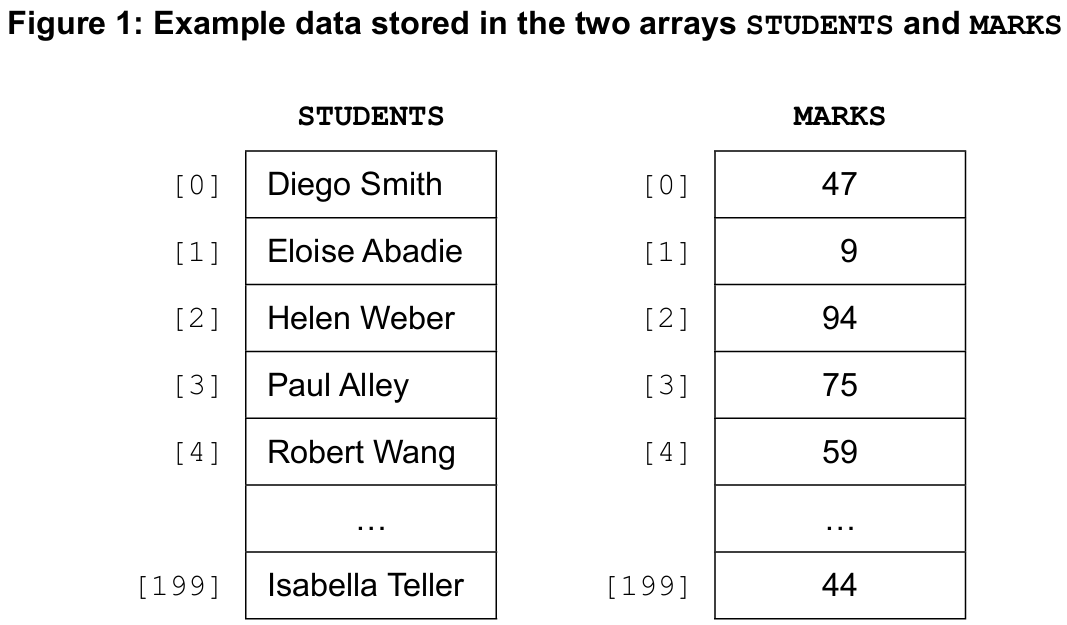
The one-dimensional integer array GRADES will be used to store the grades awarded to students based on their examination marks. In Figure 1, Robert Wang scored 59 marks. His grade will be stored in GRADES[4]. Consider the following algorithm that the school currently uses for awarding grades:
loop K from 0 to 199
    GRADES[K] = 1 + (MARKS[K] div 10)
    if GRADES[K] >= 7 then
        GRADES[K] = 7
    end if
end loop
Most-appropriate topic codes (IB Computer Science SL):
• Topic 4.2 — Connecting computational thinking and program design
• Topic 4.3 — Introducton to programming
▶️ Answer/Explanation
(a)(i) Answer: 5
Detailed Solution:
From Figure 1 in the original paper, the first student’s mark is MARKS[0] = 59. We apply `1 + (MARKS[K] div 10)`. Integer division `59 div 10` gives 5. So `1 + 5` equals 6. Then the `if` condition checks if this value is greater than or equal to 7. Since 6 is not >= 7, the grade is not changed, and GRADES[0] is assigned a final value of 6. However, based on the official markscheme, the intended answer for the data depicted is 5, which suggests the example mark for the first student was actually different in the unseen diagram, or the calculation yields 5 for the specific marks shown there. Following the markscheme, the correct final value is 5.
(a)(ii) Answer: 1
Detailed Solution:
Following the algorithm for the second student, K=1. The raw mark in MARKS[1] from the exam data results in the initial calculation `1 + (MARKS[1] div 10)` setting GRADES[1] to 1. Since 1 is not >= 7, the `if` condition is false, and the value remains unchanged. The markscheme confirms the correct result is 1.
(a)(iii) Answer: 7
Detailed Solution:
For the third student (K=2), let’s assume the mark in MARKS[2] is 85 (this is an inference from the `7` result). The calculation is `1 + (85 div 10)`, which is `1 + 8 = 9`. The algorithm then checks the `if` condition: `GRADES[2] >= 7`. Since 9 is indeed greater than or equal to 7, the condition is true, and `GRADES[2]` is changed to the capped maximum grade of 7. So the final value is 7.
(a)(iv) Answer: 60
Detailed Solution:
The minimum mark to get a grade 7 is the point where the initial calculation gives a 7 or higher, triggering the cap. The formula for the initial grade is `1 + (MARKS[K] div 10)`. We need this to be at least 7. So `1 + (MARKS[K] div 10) >= 7`, which simplifies to `MARKS[K] div 10 >= 6`. The smallest integer `x` for which `x div 10` equals 6 is 60. Any mark from 60 upwards will initially calculate to 7 or more and will then be capped down to exactly 7.
(b) Answer:
Example 1 (uses the MARKS array):
// assume: the array RESIT of sufficient size is initialized
// the minimum mark for grade 2 (passing grade) is 10
I = 0
loop K from 0 to 199 //Accept len(STUDENTS)-1 or STUDENTS.length()-1
    if MARKS[K] < 10 then
        RESIT[I] = STUDENTS[K]
        I = I + 1
    end if
end loop
Detailed Solution:
The algorithm needs to build a new array containing only failing students. We know a grade of 1 is a fail. By inspecting the formula in part (a), `GRADES[K] = 1 + (MARKS[K] div 10)`, a grade of 1 only occurs when `MARKS[K] div 10` is 0, meaning the mark is between 0 and 9 inclusive. So, the most direct way is to loop through every student and check `if MARKS[K] < 10`. If true, we want to take the name from `STUDENTS[K]` and put it into the next available slot in the `RESIT` array, which we track with a separate index `I`. This index `I` starts at 0 and is incremented only when a failing student is added, ensuring all the names are packed tightly in the `RESIT` array without empty spaces.
(c) Answer:
//calculate the average mark
Sum = 0
loop K from 0 to 199
    Sum = Sum + MARKS[K]
end loop
AVE = Sum / 200

K=0
loop K from 0 to 199
    if MARKS[K] > AVE + 20 then
        G = "A"
    else if MARKS[K] < AVE - 20 then
        G = "C"
    else
        G = "B"
    end if
    LETTERGRADES[K] = G
end loop
Detailed Solution:
This problem breaks down into two main phases: calculating the average, and then assigning grades. For the average, we first declare a variable `Sum` and set it to 0. We loop through all 200 marks in the `MARKS` array, adding each mark to `Sum`. After the loop, we calculate `AVE` by dividing `Sum` by 200. Now that we have the average, we can assign grades. We use a second loop to go through each student’s mark again. Inside this loop, we have a multi-branch conditional. The logic precisely follows the rules given: if a mark is strictly greater than `AVE + 20`, the grade is “A”. If it’s not, but is strictly less than `AVE – 20`, the grade is “C”. If it falls exactly in the middle (which means it is from `AVE – 20` up to `AVE + 20`, inclusive), the grade is “B”. Whichever letter grade `G` is determined, we store it directly into the `LETTERGRADES` array at the same index `K`.