
Using a Scientific Electronic Calculator
A scientific calculator is used to carry out numerical calculations accurately and efficiently.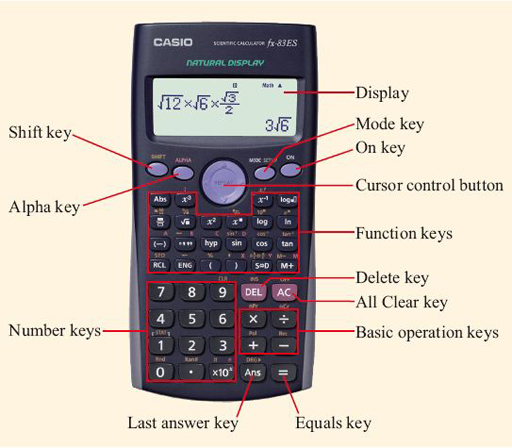
It can perform basic operations as well as powers, roots, brackets and fractions.
Basic Operations
Addition \( (+) \)
Subtraction \( (-) \)
Multiplication \( (\times) \)
Division \( (\div) \)
Important Keys
\( x^2 \) square
\( \sqrt{\phantom{x}} \) square root
\( x^y \) power
\( (\; ) \) brackets
Fraction key \( \dfrac{a}{b} \)
Order of Entry
Enter the calculation exactly as written, including brackets.
Calculators follow the hierarchy of operations automatically.
Key Tips
Use brackets for the numerator and denominator of fractions.
Use the negative key \( (-) \) for negative numbers.
Check the display carefully before pressing equals.
Example 1:
Evaluate \( 36 \div 4 + 5 \).
▶️ Answer/Explanation
Enter: \( 36 \div 4 + 5 \)
\( 36 \div 4 = 9 \)
\( 9 + 5 = 14 \)
Conclusion: \( 14 \).
Example 2:
Find \( \sqrt{225} \).
▶️ Answer/Explanation
Press: \( \sqrt{\phantom{x}} 225 \)
\( = 15 \)
Conclusion: \( 15 \).
Example 3:
Evaluate \( (3+5)^2 \).
▶️ Answer/Explanation
Enter: \( (3+5)^2 \)
\( 8^2 = 64 \)
Conclusion: \( 64 \).